VGInterface.com
Search Downloads


Go Back   VGInterface > Stand Alone Interface Pieces > TradeSkills

Category: TradeSkillsMaddyCraft 2.12
Interface Information
Download
How do I install this? (FAQ)
Name: MaddyCraft 2.12   Popular!
Author:
Date: 09-09-2008 07:10 PM
Size: 37.17 Kb
Version: 2.12
Rate Addon: 5 out of 5 with 10 votes  
Patch & Add-on List
File Name
Version
Size
Author
Date
Type
2.10
37.86 Kb
12-12-2007 05:53 PM
Addon
2.10
4.82 Kb
12-08-2007 04:37 PM
Addon
Pictures
Click to enlarge 

Views: 0
Size: 90.84 Kb
Dimensions: 990 x 412
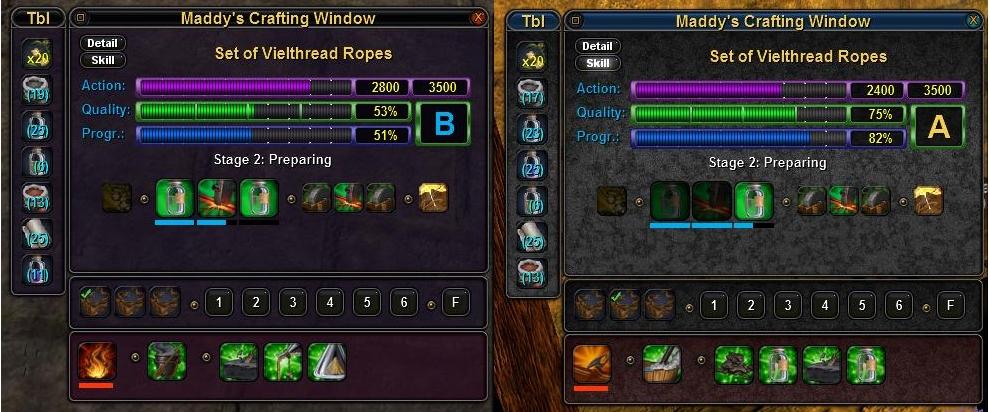
MaddyCraft integrated in myUI / CoreUI3.
 
Click to enlarge 

Views: 0
Size: 245.12 Kb
Dimensions: 1122 x 1156
Table Setup including Macro-Buttons and expanded Item-List (integrated in myUI / CoreUI3)
 
Click to enlarge 

Views: 0
Size: 124.70 Kb
Dimensions: 1094 x 501
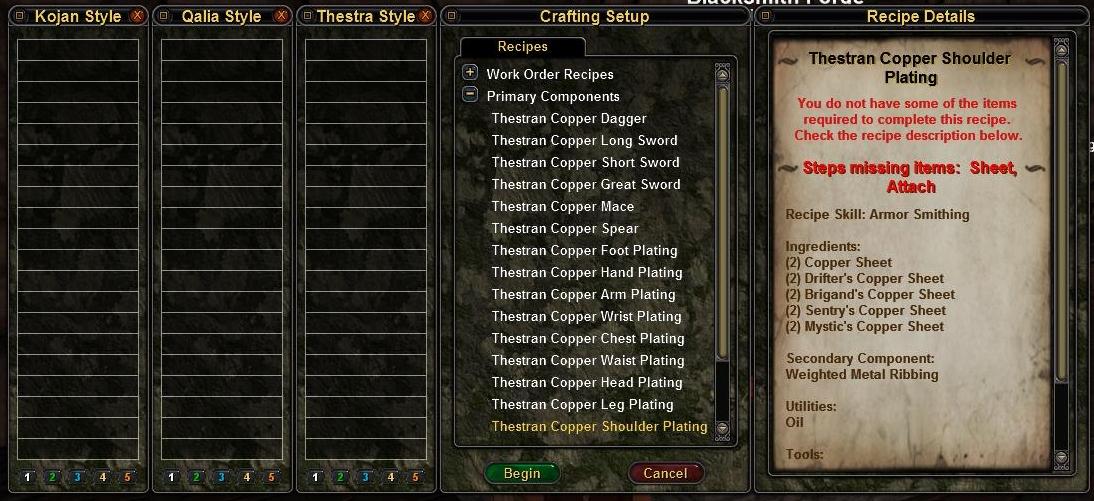
Refining Start with Mother's Quick Recipe Bar integrated.
 
Click to enlarge 

Views: 0
Size: 72.61 Kb
Dimensions: 700 x 538
Crafting Skills and Recipe-Details during crafting process.
 
Description
Maddy Craft 2.12

Updated for compatibility with GU6

Just a minor update, fixes all "togglewindow"-calls.


Maddy Craft 2.11

Updated for compatibility with GU5

Finally after 6 moths I returned to this beatiful game and found the time to update this little craft-UI...

Highlights:
  • Cancel Bug fixed.
  • Finisher button uses all possible finishing actions.
  • Recipe Details reworked.
  • Included RefiningStart with continental recipe macro bars and without any recipe macros. You can select the one you need by activating the corresponding line like shown in the included Index.xml.


Maddy Craft 2.10

Updated for compatibility with GU3.2

Just removed all the presets until the corresponding UI's are fixed. This update includes the fixe to the toolbelt-problem!

Highlights:
  • Refining-Start: Mother's faboulus Quick Recipe Bar integrated. Define up to 50 Recipe-Shortcuts here! For further instructions how to do that look at Mothers descriptions please!
  • Refining-Start: Nadgers missing items integrated in Recipe-Details page.
  • Table-Setup: Useable Item List redone to show more items at once.
  • Table-Setup: Switch to Text-Only-Mode to see even more items!
  • Table-Setup: You can place 12 Text-Macros with /refineadditem "xxx" entries now.
  • Craft-Window: Redone for a more compact look.
  • Craft-Window: Catalyst protection based on Mothers idea and using Nadgers look integrated.
  • Craft-Window: The original Sweetcraft-Skillwindow returned! Use the small "Skill"-Button at the upper left corner to adjust your skills on the fly. Additionally to your current skills you can see the base-values directly.
  • Craft-Window: Ever wondered what grade was required for the actual recipe during processing? Press the small "Detail"-Button to have a look at the details of the current recipe.

Idea behind it:
It's based on the good old Sweetcraft UI from Sweetwheat, which is not to be found on this site and not maintained since March 07. I loved his UI so I took it over and modified it to meet my needs. It was desinged to minimize Mouse-Action during the crafting process. And here's the result.

Features:
  • Table Inventory to the left, top to bottom filling and expanding as needed
  • Table setup rearranged and including an area for 8 Macro-Buttons. Here you can put any /refineadditem "xxx" - Macros you need.
  • Actual crafting status at the top of the window, with all relevant information. This uses some modified graphics from Xyndyr's myUI 2.0, which I used during development.
  • Cancel Button at the top-right (the "X"), out of the way of the whole crafting action.
  • One-click-toobelt
  • Crafting-Macro-Buttons based on the so called "Single Action, One Click Step and Action Method" described at the VanguardCrafters-Forum. These are marked "1" to "6" corresponding to the Action of the "active step". The "active step" is the left-most of the available Action-Steps. Recipes with up to 9 Action-Steps are working with these buttons. You need to use the default Crafting-Buttons for steps above nine.
  • "The Finisher" - Button, based on the "Single Action Final Step Macro", found at the same source as above. This button can be used during the last finishing Action-Step. Based on the AP left it activates the best step (with most quality in return) for the Finisher. Again if the Recipe has more than nine steps, this button doesn't work.
  • Complications and Remedies, all in a row at the bottom of the Window as needed.
  • Removed most texts so this one is probably not for crafting beginners!

Installation
Basically it's not meant to be a standalone UI-Mod, although it could be used this way. This Modification can be integrated in most, if not all Custom UIs. Included in the download are Presets for most actual Custom-UIs. Use these at your own risk! I have not tested all of them enough, but they should work. Make a backup of the original files before trying out! If you use a preset, just copy the directories and files into your Mod-Directory (for CoreUI3 you have to copy the content of the Index-file into your Index.xml ! )

To include in a custom Mod follow these step:
  1. Download and unpack the ZIP-File
  2. Copy the contents of the included "Textures"- and "Windows"-Folder into the corresponding Folder of the custum UI.
  3. Open the "SkinInfo.xml" of your custom-UI (with NotePad or some any other editor) and include these lines:

    <AnimationDefinitions directory="Textures">
    <AnimationDefinition filename="MaddyParts.xml"/>
    </AnimationDefinitions>


    Please take the included "SkinInfo.xml"-File as an example. Save the file.
  4. Open the "Index.xml"-File of your custom-UI (with NotePad or some any other editor) and search for the section
  5. Find the following lines and comment them out as needed or even delete them:

    ...
    <Window filename="VGUICrafting.xml"/>
    <Window filename="VGUICraftingActions.xml"/>
    <Window filename="VGUICraftingCatalyst.xml"/>
    <Window filename="VGUICraftingComplications.xml"/>
    <Window filename="VGUICraftingInventory.xml"/>
    <Window filename="VGUICraftingRemedies.xml"/>
    <Window filename="VGUICraftingToolbelts.xml"/>
    <Window filename="VGUICraftingWorkbench.xml"/>
    <Window filename="VGUICraftingWorkbenchFilling.xml"/>
    ...
    <Window filename="VGUIRefiningStart.xml"/>

  6. Search for any other "VGUICrafting...xml" and "VGUIRefiningStart.xml" entries within the file, probably from other Crafting-Mods included in your custom-UI and comment them out or delete them.
  7. Add the following lines to the "Index.xml"-File:

    <GameplayWindows directory="Windows">
    <Window filename="Maddy_Crafting.xml"/>
    <Window filename="Maddy_CraftingRecipeDetails.xml"/>
    <Window filename="Maddy_CraftingSkills.xml"/>
    <Window filename="Maddy_RefiningStart.xml"/>
    <Window filename="Maddy_TableSetup.xml"/>
    </GameplayWindows>


    Again please take the included "Index.xml" as an example.
  8. Save the file and launch Vanguard!

If you have problem, feel free to ask for assistance!

Credits:
Sweetwheat, for his lovely Craft-UI. Without that I would have never reached T5 in crafting.
Xyndyr, for his beautiful myUI2.0 I've got some graphis from (This mod will graphically fit nicely into myUI2.0, btw!).
Nadger, for his awesome CoreUI3.
Mother and Taiisien, for their Crafting-Mods, I've used for some ideas.
Archive List (Old Versions)
File Name
Version
Size
Author
Date
2.12
37.17 Kb
MadOverlord
09-09-2008 04:14 PM
2.12
37.17 Kb
MadOverlord
09-09-2008 02:43 PM
2.11
37.04 Kb
MadOverlord
07-16-2008 04:19 PM
2.10
27.86 Kb
MadOverlord
12-12-2007 05:51 PM
2.00
306.77 Kb
MadOverlord
10-22-2007 09:05 AM
1.00
59.06 Kb
MadOverlord
09-19-2007 06:13 AM
File Statistics
User Rating:
5 out of 5 with 10 votes
Downloads: 2491
Views: 12928
Favorites: 16
Uploaded By:
 
Last Modified: N/A

View Pictures. Download Now! Post A Comment


Post A Reply
Author Comments Comment Options
Old 10-08-2008, 06:48 PM  
Prismv
Junior Member

Forum posts: 15
File comments: 1
Uploads: 0
This mod is a life saver, great work.

My one problem though is that because the background is so dark, I am stuggling to see my progress bars, (black on black quite hard to see)

I notice in the screenshots that there is a greyish background, how do I change this then it is perfect for me?
Prismv is offline Report comment to moderator   Reply With Quote Reply With Quote
Old 10-05-2008, 02:53 PM  
justcallmefred
Junior Member

Forum posts: 11
File comments: 1
Uploads: 0
I tried it too Lao, I did what was posted over there and downloaded the 2 needed files...and it's the same as yours...so you and your husband are not going looney
justcallmefred is offline Report comment to moderator   Reply With Quote Reply With Quote
Old 10-02-2008, 03:45 PM  
Lao
Junior Member

Forum posts: 12
File comments: 6
Uploads: 0
well still trying to get this to work, have a thread going on here http://vginterface.com/forums/sh...6268#post16268

madoverlord and craeat has tried to help , thanks guys for trying. Anymore ideas?
Lao is offline Report comment to moderator   Reply With Quote Reply With Quote
Old 09-27-2008, 05:40 PM  
Lao
Junior Member

Forum posts: 12
File comments: 6
Uploads: 0
Well maddy doesnt work well with others, I tried the ui called slcustom wich comes with maddy but i hate the rest of te ui so does me no good. maddy did work fine, i love it, but it wont work with drox or myui which is 2 i am willing to use.
It doesnt look like anyone checks these message boards so ill will try contacting the creator directly i guess.
Lao is offline Report comment to moderator   Reply With Quote Reply With Quote
Old 09-27-2008, 05:23 PM  
Lao
Junior Member

Forum posts: 12
File comments: 6
Uploads: 0
I tried to make this work again, spent a good part of the day doing it, did everything in the instruction to the letter, made sure of it, and still doesnt work, I click on a crafting station (blacksmith smelter refining to be exact) and no tradeskill window at all pops up, the text "select the recipi you wish to use" come up in the chat window but there isnt a craft window.
My next stap would be to download a UI premade with your tradeskill window in it to see if it even works. if it does it is a case of your UI doesn't play well with others. In which case I wont be able to use it will let you know.
Lao is offline Report comment to moderator   Reply With Quote Reply With Quote
Old 09-27-2008, 02:21 AM  
Lao
Junior Member

Forum posts: 12
File comments: 6
Uploads: 0
UG

I would love to try this crafting window but alas I couldnt get it to work, im not sure if there is anyway to do it more.... simply... but it seems really in depth, go in and recode this delete that type this...... hopefully it works someday, would love to try it.
Lao is offline Report comment to moderator   Reply With Quote Reply With Quote
Old 09-22-2008, 02:26 PM  
Ticoro
Junior Member

Forum posts: 0
File comments: 2
Uploads: 0
Post How to integrate into Drox 2.6.3

Hello,
I really like this crafting UI. Could some tell me how in imple english how to integrate this into DroxUI 2.6.3? I know NOTHING about programming at all but want to use this with the Drox UI.

Thanks in advance
Ticoro is offline Report comment to moderator   Reply With Quote Reply With Quote
Old 09-14-2008, 11:10 AM  
waypoc
Junior Member

Forum posts: 7
File comments: 10
Uploads: 0
ok looks like i am somewhat successful.

though i am starting to believe there may an issue with my installation of drox as well or a combo of things.

i am admin and my ui doesn't want to stick. as soon as i hover over a button it resets.

going to rebuild it and see what happens.

thanks again
waypoc is offline Report comment to moderator   Reply With Quote Reply With Quote
Old 09-14-2008, 10:52 AM  
waypoc
Junior Member

Forum posts: 7
File comments: 10
Uploads: 0
ahh thanks but the only reason i said that was that after i added the rem to the end of the remmed out line did i get anything that looked like a ui.

i will make the change noted and reply.

thanks for the help.
waypoc is offline Report comment to moderator   Reply With Quote Reply With Quote
Old 09-14-2008, 06:40 AM  
MadOverlord
Junior Member
Interface Author - Click to view interfaces

Forum posts: 6
File comments: 18
Uploads: 3
Re: didn't work

Quote:
I TRIED OUT THE CHANGES AND REALIZED THAT I NEEDED TO REM OUT BOTH SIDES OF THE STATEMENT.
wrong, you just needed to delete the single line i mentioned, not before and after the statement!

Your index.xml is now missing one closing of a <GameplayWindows > section, see below (add the text in red):
Quote:
<!-- Support for independent map projects -->
<GameplayWindows directory="Map">
<Window filename="VGUIMap.xml"/>
<Window filename="VGUIMiniMap.xml"/>
<Window filename="RiftMaps.xml"/>
</GameplayWindows>
<!-- MaddyCraft -->
<GameplayWindows directory="Windows">
<Window filename="Maddy_Crafting.xml"/>
<Window filename="Maddy_CraftingRecipeDetails.xml"/>
<Window filename="Maddy_CraftingSkills.xml"/>
<Window filename="Maddy_RefiningStart.xml"/>
<Window filename="Maddy_TableSetup.xml"/>
</GameplayWindows>
MadOverlord is offline Report comment to moderator   Reply With Quote Reply With Quote
Old 09-13-2008, 09:00 PM  
waypoc
Junior Member

Forum posts: 7
File comments: 10
Uploads: 0
cont'd -

what happens now is that when i click the droxui settings button, nothing comes up. that goes for social window and several others as well.

so we're getting closer now. i get more than just the chat window but things are still borked.

see index below.

also here is my skin file:
<?xml version="1.0" encoding="UTF-8" standalone="yes" ?>
<XML id="SGOUIMarkupLanguage" version="0.1"
xmlns="http://www.sigilgames.com/vanguard-ui-0.1"
xmlns:xsi="http://www.w3.org/2001/XMLSchema-instance"
xsi:schemaLocation="http://www.sigilgames.com/vanguard-ui-0.1 ../../vanguard-ui.xsd">
<SkinInfo name="Vgrd">
<!-- Custom Animations -->
<AnimationDefinitions directory="Textures">
<AnimationDefinition filename="DroxParts.xml"/>
<AnimationDefinition filename="BookParts.xml"/>
</AnimationDefinitions>
<AnimationDefinitions directory="Textures">
<AnimationDefinition filename="MaddyParts.xml"/>
</AnimationDefinitions>
<AnimationDefinitions directory="../Default/Textures">
<!-- AnimationDefinition filename="RiftAnimations.xml"/ -->
<AnimationDefinition filename="VgrdBackgrounds.xml"/>
<AnimationDefinition filename="VgrdChat.xml"/>
<AnimationDefinition filename="VgrdParts.xml"/>
<AnimationDefinition filename="VgrdParts02.xml"/>
<AnimationDefinition filename="VgrdParts03.xml"/>
<AnimationDefinition filename="VgrdParts04.xml"/>
<AnimationDefinition filename="VgrdDiplomacy.xml"/>
<AnimationDefinition filename="VgrdMinimap.xml"/>
<AnimationDefinition filename="VgrdStories.xml"/>
</AnimationDefinitions>
<!-- Standardized Map Skins -->
<AnimationDefinitions directory="Map">
<AnimationDefinition filename="MapSkin.xml"/>
<AnimationDefinition filename="RiftAnimations.xml"/>
</AnimationDefinitions>
<ExternalControls>
<ExternalControl type="CloseBox">
<!-- Parent HT -->
<Parent>TopRight</Parent>
<!-- Relative Position -->
<Point x="-5" y="4"/>
</ExternalControl>
<ExternalControl type="MinimizeBox">
<!-- Parent HT -->
<Parent>TopRight</Parent>
<!-- Relative Position -->
<Point x="-20" y="5"/>
</ExternalControl>
<ExternalControl type="RollupBox">
<!-- Parent HT -->
<Parent>TopLeft</Parent>
<!-- Relative Position -->
<Point x="7" y="4"/>
</ExternalControl>
</ExternalControls>
<!--Title bar setting options-->
<TitleBarTextSettings color="gold" size="12">
<Offset>
<Point x="0" y="2"/>
</Offset>
</TitleBarTextSettings>

<BackgroundOffsets topEdge="-5" bottomEdge="5" leftEdge="-8" rightEdge="8"/>

<BackgroundOffsetsFrameAll topEdge="-4" bottomEdge="4" leftEdge="-4" rightEdge="4"/>

</SkinInfo>
</XML>
waypoc is offline Report comment to moderator   Reply With Quote Reply With Quote
Old 09-13-2008, 08:57 PM  
waypoc
Junior Member

Forum posts: 7
File comments: 10
Uploads: 0
didn't work

I TRIED OUT THE CHANGES AND REALIZED THAT I NEEDED TO REM OUT BOTH SIDES OF THE STATEMENT.

Here is my new index file:
<?xml version="1.0" encoding="utf-8" standalone="yes"?>
<XML id="SGOUIMarkupLanguage" version="0.1"
xmlns="http://www.sigilgames.com/vanguard-ui-0.1"
xmlns:xsi="http://www.w3.org/2001/XMLSchema-instance"
xsi:schemaLocation="http://www.sigilgames.com/vanguard-ui-0.1 ../../vanguard-ui.xsd">
<!-- Backgrounds needs to be loaded first. -->
<SystemWindows directory="Windows">
<Window filename="Drox_Backgrounds.xml"/>
</SystemWindows>

<!-- These windows are required for the client to startup. They are loaded at initial run-time.
Removing windows or window components from these files is likely to cause crashes. -->
<SystemWindows directory="..\Default\Windows">
<Window filename="VGUICharacterCreationWnd.xml"/>
<Window filename="VGUIChatWnd.xml"/>
<!--Window filename="VGUICompass.xml"/-->
<Window filename="VGUIExaminePopups.xml"/>
<Window filename="VGUIHotkeyMacro.xml"/>
<!--Window filename="VGUIHotkeys.xml"/-->
<Window filename="VGUILoginWnd.xml"/>
<!--Window filename="VGUIMainBar.xml"/-->
<Window filename="VGUISettingsWnd.xml"/>
</SystemWindows>
<!-- These gameplay windows are loaded when you enter the game.
Gameplay windows are significantly safer to edit than system windows. -->
<GameplayWindows directory="..\Default\Windows">
<!-- Window filename="RiftMaps.xml"/ -->
<!-- Window filename="VGUIAbilities.xml"/ -->
<Window filename="VGUIAcceptDecline.xml"/>
<Window filename="VGUIAssembly.xml"/>
<!--Window filename="VGUIAssemblyTimer.xml"/-->
<Window filename="VGUIAssemblyTrainer.xml"/>
<!-- Window filename="VGUIAttachedAbilities.xml"/ -->
<Window filename="VGUIAttackResultsDisplay.xml"/>
<Window filename="VGUIBank.xml"/>
<Window filename="VGUIBugReport.xml"/>
<Window filename="VGUIBuildingConstruction.xml"/>
<Window filename="VGUIBuildingInformationWnd.xml"/>
<Window filename="VGUIBuildingInventory.xml"/>
<!-- Window filename="VGUICastBar.xml"/ -->
<Window filename="VGUICharacter.xml"/>
<Window filename="VGUIClaimWnd.xml"/>
<Window filename="VGUICombatInv.xml"/>
<Window filename="VGUIConversion.xml"/>
<Window filename="VGUICorpseList.xml"/>
<Window filename="VGUICountdown.xml"/>
<!-- Window filename="VGUICrafting.xml"/>-->
<!-- Window filename="VGUICraftingActions.xml"/>-->
<!-- Window filename="VGUICraftingCatalyst.xml"/>-->
<!-- Window filename="VGUICraftingComplications.xml"/>-->
<!-- Window filename="VGUICraftingInventory.xml"/>-->
<!-- Window filename="VGUICraftingRemedies.xml"/>-->
<!-- Window filename="VGUICraftingToolbelts.xml"/>-->
<!-- Window filename="VGUICraftingWorkbench.xml"/>-->
<!-- Window filename="VGUICraftingWorkbenchFilling.xml"/>-->
<Window filename="VGUICurrentWorkOrders.xml"/>
<Window filename="VGUIDeathReleasePopup.xml"/>
<Window filename="VGUIDialogs.xml"/>
<!-- Window filename="VGUIEncounterDisplay.xml"/ -->
<Window filename="VGUIEventDisplay.xml"/>
<Window filename="VGUIEventDisplayEntry.xml"/>
<!-- Window filename="VGUIGroup.xml"/ -->
<Window filename="VGUIGroupLootOptions.xml"/>
<Window filename="VGUIGuildManagement.xml"/>
<Window filename="VGUIHarvestingDisplay.xml"/>
<Window filename="VGUIInspect.xml"/>
<Window filename="VGUIInventory.xml"/>
<Window filename="VGUIInventoryContainerTemplate.xml"/>
<Window filename="VGUIInventoryPopups.xml"/>
<Window filename="VGUILoot.xml"/>
<Window filename="VGUIMailWnd.xml"/>
<!-- Window filename="VGUIMaintainedAbilities.xml"/ -->
<!-- Window filename="VGUIMap.xml"/ -->
<Window filename="VGUIMarketWnd.xml"/>
<Window filename="VGUIMemTimeRemaining.xml"/>
<Window filename="VGUIMerchant.xml"/>
<Window filename="VGUIMinions.xml"/>
<!-- Window filename="VGUIMiniMap.xml"/ -->
<Window filename="VGUINPCOptionsMenu.xml"/>
<!--Window filename="VGUIObjectInteraction.xml"/-->
<Window filename="VGUIParley.xml"/>
<!-- Window filename="VGUIPet.xml"/ -->
<Window filename="VGUIPetitionWnd.xml"/>
<!-- Window filename="VGUIPlayerStatus.xml"/ -->
<!-- Window filename="VGUIQuests.xml"/ -->
<Window filename="VGUIQuestStatus.xml"/>
<Window filename="VGUIRandomLootInvitation.xml"/>
<!-- Window filename="VGUIReactions.xml"/ -->
<Window filename="VGUIRecipeTrainer.xml"/>
<Window filename="VGUIRefiningActions.xml"/>
<Window filename="VGUIRefiningAlerts.xml"/>
<!-- Window filename="VGUIRefiningStart.xml"/ -->
<Window filename="VGUIRefiningStatus.xml"/>
<Window filename="VGUISailing.xml"/>
<!-- Window filename="VGUISocialWnd.xml"/ -->
<Window filename="VGUISong.xml"/>
<!-- Window filename="VGUITaskMasterWorkOrders.xml"/ -->
<Window filename="VGUITrade.xml"/>
<Window filename="VGUITrainer.xml"/>
<Window filename="VGUITutorial.xml"/>
<Window filename="DiplomacyComponents\VGUIParleyCard.xml"/>
<Window filename="VGUIParleyStrategy.xml"/>
<Window filename="VGUITestData.xml"/>
<!-- Window filename="VGUIRaidManagement.xml"/ -->
<!--Window filename="VGUITargetBuffs.xml"/-->
<!--Window filename="VGUITargetBuffsNoText.xml"/-->
<!--Window filename="VGUITargetDebuffs.xml"/-->
<!--Window filename="VGUITargetDebuffsNoText.xml"/-->
<!--Window filename="VGUITargetDebuffsMine.xml"/-->
<!--Window filename="VGUITargetWeaknesses.xml"/-->
<!--Window filename="VGUITargetWeaknessesNoText.xml"/-->
<!--Window filename="VGUIIconTargetSpellsAndWeaknesses.xml"/-->
<Window filename="VGUITrialWnd.xml"/>
</GameplayWindows>
<!-- Changed Files -->
<SystemWindows directory="Windows">
<Window filename="Drox_GameMenu.xml"/>
<Window filename="Drox_Hotbar12x12.xml"/>
<Window filename="Drox_HotbarContainers.xml"/>
<Window filename="Drox_HotbarForms.xml"/>
<Window filename="Drox_HotbarG15.xml"/>
<Window filename="Drox_Hotbars3x4.xml"/>
<Window filename="Drox_HotbarNumpad.xml"/>
<Window filename="Drox_HotbarsMeleeAndRanged.xml"/>
<Window filename="Drox_HotbarsWindowButtons.xml"/>
<Window filename="Drox_HotbarMain.xml"/>
<Window filename="Drox_HotbarN52.xml"/>
<Window filename="Drox_HotbarsHorizontal.xml"/>
<Window filename="Drox_HotbarsVertical.xml"/>
</SystemWindows>
<!-- Support for independent map projects -->
<GameplayWindows directory="Map">
<Window filename="VGUIMap.xml"/>
<Window filename="VGUIMiniMap.xml"/>
<Window filename="RiftMaps.xml"/>

<!-- MaddyCraft -->
<GameplayWindows directory="Windows">
<Window filename="Maddy_Crafting.xml"/>
<Window filename="Maddy_CraftingRecipeDetails.xml"/>
<Window filename="Maddy_CraftingSkills.xml"/>
<Window filename="Maddy_RefiningStart.xml"/>
<Window filename="Maddy_TableSetup.xml"/>
</GameplayWindows>
<GameplayWindows directory="Windows">
<Window filename="Drox_Abilities.xml"/>
<Window filename="Drox_AssemblyTimer.xml"/>
<Window filename="Drox_BreathMeter.xml"/>
<Window filename="Drox_BufferHotbar.xml"/>
<Window filename="Drox_CastBar.xml"/>
<Window filename="Drox_Clock.xml"/>
<Window filename="Drox_ClothingChanger.xml"/>
<Window filename="Drox_CompassClock.xml"/>
<Window filename="Drox_ControlPanel.xml"/>
<Window filename="Drox_DefensiveTarget.xml"/>
<Window filename="Drox_EncounterHUDVertical.xml"/>
<Window filename="Drox_ExperienceBar.xml"/>
<Window filename="Drox_GroupInvite.xml"/>
<Window filename="Drox_GroupHUDVertical.xml"/>
<Window filename="Drox_GroupHUDVerticalInflight.xml"/>
<Window filename="Drox_HealerHotbarVertical.xml"/>
<Window filename="Drox_GroupLeaderAndLootInfo.xml"/>
<Window filename="Drox_InformationBar.xml"/>
<Window filename="Drox_ObjectInteraction.xml"/>
<Window filename="Drox_OffensiveTarget.xml"/>
<Window filename="Drox_Pet.xml"/>
<Window filename="Drox_PetStatus.xml"/>
<Window filename="Drox_PlayerStatus.xml"/>
<Window filename="Drox_Quests.xml"/>
<Window filename="Drox_ReactionAbilitiesVertical.xml"/>
<Window filename="Drox_TextBuffs.xml"/>
<Window filename="Drox_TextDebuffs.xml"/>
<Window filename="Drox_TextMaintainedAbilities.xml"/>

<Window filename="Drox_TextTargetBuffs.xml"/>
<Window filename="Drox_TextTargetDebuffs.xml"/>
<Window filename="Drox_TextTargetDebuffsMine.xml"/>
<Window filename="Drox_TextTargetWeaknesses.xml"/>
<Window filename="Drox_UILoader.xml"/>
<Window filename="Cylus_AttributeData.xml"/>
<Window filename="ExpandedTaskMasterWorkOrders.xml"/>
<!-- <Window filename="ExpandedRefiningStart.xml"/>-->
<Window filename="Drox_RaidManagement.xml"/>
<Window filename="VGUISocialWnd.xml"/>
<!-- BEGIN: WINDOWS LOADED BUT NOT USED IN THE DEFAULT LAYOUT -->
<Window filename="Drox_Compass.xml"/>
<Window filename="Drox_LagMeter.xml"/>
<Window filename="Drox_DefensiveTargetHUD.xml"/>
<Window filename="Drox_EncounterWindowDefault.xml"/>
<Window filename="Drox_EncounterHUDHorizontal.xml"/>
<Window filename="Drox_EncounterHUDVerticalUp.xml"/>
<Window filename="Drox_GroupWindowDefault.xml"/>
<Window filename="Drox_GroupWindowHorizontal.xml"/>
<Window filename="Drox_GroupWindowHorizontalInflight.xml"/>
<Window filename="Drox_GroupHUDHorizontal.xml"/>
<Window filename="Drox_HealerHotbarHorizontal.xml"/>

<Window filename="Drox_IconBuffsAndDebuffs.xml"/>
<Window filename="Drox_IconMaintainedAbilities.xml"/>

<Window filename="Drox_TextBuffsUp.xml"/>
<Window filename="Drox_TextDebuffsUp.xml"/>
<Window filename="Drox_TextMaintainedAbilitiesUp.xml"/>
<Window filename="Drox_IconTargetBuffs.xml"/>
<Window filename="Drox_IconTargetDebuffs.xml"/>
<Window filename="Drox_IconTargetDebuffsMine.xml"/>
<Window filename="Drox_IconTargetWeaknesses.xml"/>
<Window filename="Drox_TextTargetBuffsUp.xml"/>
<Window filename="Drox_TextTargetDebuffsUp.xml"/>
<Window filename="Drox_TextTargetWeaknessesUp.xml"/>
<Window filename="Drox_PetStatusHUD.xml"/>
<Window filename="Drox_ReactionAbilitiesHorizontal.xml"/>
<!-- END: WINDOWS LOADED BUT NOT USED IN THE DEFAULT LAYOUT -->
<!-- BEGIN: WINDOWS THAT WILL NOT BE LOADED
Move window references that you don't use in your layout between these begin/end statements
so that they don't load. This will improve the performance of your game.
END: WINDOWS THAT WILL NOT BE LOADED
-->
</XML>
waypoc is offline Report comment to moderator   Reply With Quote Reply With Quote
Old 09-13-2008, 04:09 PM  
MadOverlord
Junior Member
Interface Author - Click to view interfaces

Forum posts: 6
File comments: 18
Uploads: 3
Re: Drox and Maddy

The bug is in you index.xml-file:

Quote:
...
</GameplayWindows>
<!-- MaddyCraft -->
</GameplayWindows> <--- remove this line!!!
<GameplayWindows directory="Windows">
<Window filename="Maddy_Crafting.xml"/>
...
Also command out the following line, otherwise two different Refing-Start-Windows will pop-up:
Quote:
<Window filename="ExpandedRefiningStart.xml"/>
Change to:
Quote:
<!-- <Window filename="ExpandedRefiningStart.xml"/> -->
Hope we've catched all bugs...
MadOverlord is offline Report comment to moderator   Reply With Quote Reply With Quote
Old 09-13-2008, 02:25 PM  
waypoc
Junior Member

Forum posts: 7
File comments: 10
Uploads: 0
DroxUI and Maddy

I have no UI except for the chat window.
Here is my drox indez file that bombed:

<?xml version="1.0" encoding="utf-8" standalone="yes"?>
<XML id="SGOUIMarkupLanguage" version="0.1"
xmlns="http://www.sigilgames.com/vanguard-ui-0.1"
xmlns:xsi="http://www.w3.org/2001/XMLSchema-instance"
xsi:schemaLocation="http://www.sigilgames.com/vanguard-ui-0.1 ../../vanguard-ui.xsd">
<!-- Backgrounds needs to be loaded first. -->
<SystemWindows directory="Windows">
<Window filename="Drox_Backgrounds.xml"/>
</SystemWindows>

<!-- These windows are required for the client to startup. They are loaded at initial run-time.
Removing windows or window components from these files is likely to cause crashes. -->
<SystemWindows directory="..\Default\Windows">
<Window filename="VGUICharacterCreationWnd.xml"/>
<Window filename="VGUIChatWnd.xml"/>
<!--Window filename="VGUICompass.xml"/-->
<Window filename="VGUIExaminePopups.xml"/>
<Window filename="VGUIHotkeyMacro.xml"/>
<!--Window filename="VGUIHotkeys.xml"/-->
<Window filename="VGUILoginWnd.xml"/>
<!--Window filename="VGUIMainBar.xml"/-->
<Window filename="VGUISettingsWnd.xml"/>
</SystemWindows>
<!-- These gameplay windows are loaded when you enter the game.
Gameplay windows are significantly safer to edit than system windows. -->
<GameplayWindows directory="..\Default\Windows">
<!-- Window filename="RiftMaps.xml"/ -->
<!-- Window filename="VGUIAbilities.xml"/ -->
<Window filename="VGUIAcceptDecline.xml"/>
<Window filename="VGUIAssembly.xml"/>
<!--Window filename="VGUIAssemblyTimer.xml"/-->
<Window filename="VGUIAssemblyTrainer.xml"/>
<!-- Window filename="VGUIAttachedAbilities.xml"/ -->
<Window filename="VGUIAttackResultsDisplay.xml"/>
<Window filename="VGUIBank.xml"/>
<Window filename="VGUIBugReport.xml"/>
<Window filename="VGUIBuildingConstruction.xml"/>
<Window filename="VGUIBuildingInformationWnd.xml"/>
<Window filename="VGUIBuildingInventory.xml"/>
<!-- Window filename="VGUICastBar.xml"/ -->
<Window filename="VGUICharacter.xml"/>
<Window filename="VGUIClaimWnd.xml"/>
<Window filename="VGUICombatInv.xml"/>
<Window filename="VGUIConversion.xml"/>
<Window filename="VGUICorpseList.xml"/>
<Window filename="VGUICountdown.xml"/>
<!-- Window filename="VGUICrafting.xml"/>
<!-- Window filename="VGUICraftingActions.xml"/>
<!-- Window filename="VGUICraftingCatalyst.xml"/>
<!-- Window filename="VGUICraftingComplications.xml"/>
<!-- Window filename="VGUICraftingInventory.xml"/>
<!-- Window filename="VGUICraftingRemedies.xml"/>
<!-- Window filename="VGUICraftingToolbelts.xml"/>
<!-- Window filename="VGUICraftingWorkbench.xml"/>
<!-- Window filename="VGUICraftingWorkbenchFilling.xml"/>
<Window filename="VGUICurrentWorkOrders.xml"/>
<Window filename="VGUIDeathReleasePopup.xml"/>
<Window filename="VGUIDialogs.xml"/>
<!-- Window filename="VGUIEncounterDisplay.xml"/ -->
<Window filename="VGUIEventDisplay.xml"/>
<Window filename="VGUIEventDisplayEntry.xml"/>
<!-- Window filename="VGUIGroup.xml"/ -->
<Window filename="VGUIGroupLootOptions.xml"/>
<Window filename="VGUIGuildManagement.xml"/>
<Window filename="VGUIHarvestingDisplay.xml"/>
<Window filename="VGUIInspect.xml"/>
<Window filename="VGUIInventory.xml"/>
<Window filename="VGUIInventoryContainerTemplate.xml"/>
<Window filename="VGUIInventoryPopups.xml"/>
<Window filename="VGUILoot.xml"/>
<Window filename="VGUIMailWnd.xml"/>
<!-- Window filename="VGUIMaintainedAbilities.xml"/ -->
<!-- Window filename="VGUIMap.xml"/ -->
<Window filename="VGUIMarketWnd.xml"/>
<Window filename="VGUIMemTimeRemaining.xml"/>
<Window filename="VGUIMerchant.xml"/>
<Window filename="VGUIMinions.xml"/>
<!-- Window filename="VGUIMiniMap.xml"/ -->
<Window filename="VGUINPCOptionsMenu.xml"/>
<!--Window filename="VGUIObjectInteraction.xml"/-->
<Window filename="VGUIParley.xml"/>
<!-- Window filename="VGUIPet.xml"/ -->
<Window filename="VGUIPetitionWnd.xml"/>
<!-- Window filename="VGUIPlayerStatus.xml"/ -->
<!-- Window filename="VGUIQuests.xml"/ -->
<Window filename="VGUIQuestStatus.xml"/>
<Window filename="VGUIRandomLootInvitation.xml"/>
<!-- Window filename="VGUIReactions.xml"/ -->
<Window filename="VGUIRecipeTrainer.xml"/>
<Window filename="VGUIRefiningActions.xml"/>
<Window filename="VGUIRefiningAlerts.xml"/>
<!-- Window filename="VGUIRefiningStart.xml"/ -->
<Window filename="VGUIRefiningStatus.xml"/>
<Window filename="VGUISailing.xml"/>
<!-- Window filename="VGUISocialWnd.xml"/ -->
<Window filename="VGUISong.xml"/>
<!-- Window filename="VGUITaskMasterWorkOrders.xml"/ -->
<Window filename="VGUITrade.xml"/>
<Window filename="VGUITrainer.xml"/>
<Window filename="VGUITutorial.xml"/>
<Window filename="DiplomacyComponents\VGUIParleyCard.xml"/>
<Window filename="VGUIParleyStrategy.xml"/>
<Window filename="VGUITestData.xml"/>
<!-- Window filename="VGUIRaidManagement.xml"/ -->
<!--Window filename="VGUITargetBuffs.xml"/-->
<!--Window filename="VGUITargetBuffsNoText.xml"/-->
<!--Window filename="VGUITargetDebuffs.xml"/-->
<!--Window filename="VGUITargetDebuffsNoText.xml"/-->
<!--Window filename="VGUITargetDebuffsMine.xml"/-->
<!--Window filename="VGUITargetWeaknesses.xml"/-->
<!--Window filename="VGUITargetWeaknessesNoText.xml"/-->
<!--Window filename="VGUIIconTargetSpellsAndWeaknesses.xml"/-->
<Window filename="VGUITrialWnd.xml"/>
</GameplayWindows>
<!-- Changed Files -->
<SystemWindows directory="Windows">
<Window filename="Drox_GameMenu.xml"/>
<Window filename="Drox_Hotbar12x12.xml"/>
<Window filename="Drox_HotbarContainers.xml"/>
<Window filename="Drox_HotbarForms.xml"/>
<Window filename="Drox_HotbarG15.xml"/>
<Window filename="Drox_Hotbars3x4.xml"/>
<Window filename="Drox_HotbarNumpad.xml"/>
<Window filename="Drox_HotbarsMeleeAndRanged.xml"/>
<Window filename="Drox_HotbarsWindowButtons.xml"/>
<Window filename="Drox_HotbarMain.xml"/>
<Window filename="Drox_HotbarN52.xml"/>
<Window filename="Drox_HotbarsHorizontal.xml"/>
<Window filename="Drox_HotbarsVertical.xml"/>
</SystemWindows>
<!-- Support for independent map projects -->
<GameplayWindows directory="Map">
<Window filename="VGUIMap.xml"/>
<Window filename="VGUIMiniMap.xml"/>
<Window filename="RiftMaps.xml"/>
</GameplayWindows>
<!-- MaddyCraft -->
</GameplayWindows>
<GameplayWindows directory="Windows">
<Window filename="Maddy_Crafting.xml"/>
<Window filename="Maddy_CraftingRecipeDetails.xml"/>
<Window filename="Maddy_CraftingSkills.xml"/>
<Window filename="Maddy_RefiningStart.xml"/>
<Window filename="Maddy_TableSetup.xml"/>
</GameplayWindows>
<GameplayWindows directory="Windows">
<Window filename="Drox_Abilities.xml"/>
<Window filename="Drox_AssemblyTimer.xml"/>
<Window filename="Drox_BreathMeter.xml"/>
<Window filename="Drox_BufferHotbar.xml"/>
<Window filename="Drox_CastBar.xml"/>
<Window filename="Drox_Clock.xml"/>
<Window filename="Drox_ClothingChanger.xml"/>
<Window filename="Drox_CompassClock.xml"/>
<Window filename="Drox_ControlPanel.xml"/>
<Window filename="Drox_DefensiveTarget.xml"/>
<Window filename="Drox_EncounterHUDVertical.xml"/>
<Window filename="Drox_ExperienceBar.xml"/>
<Window filename="Drox_GroupInvite.xml"/>
<Window filename="Drox_GroupHUDVertical.xml"/>
<Window filename="Drox_GroupHUDVerticalInflight.xml"/>
<Window filename="Drox_HealerHotbarVertical.xml"/>
<Window filename="Drox_GroupLeaderAndLootInfo.xml"/>
<Window filename="Drox_InformationBar.xml"/>
<Window filename="Drox_ObjectInteraction.xml"/>
<Window filename="Drox_OffensiveTarget.xml"/>
<Window filename="Drox_Pet.xml"/>
<Window filename="Drox_PetStatus.xml"/>
<Window filename="Drox_PlayerStatus.xml"/>
<Window filename="Drox_Quests.xml"/>
<Window filename="Drox_ReactionAbilitiesVertical.xml"/>
<Window filename="Drox_TextBuffs.xml"/>
<Window filename="Drox_TextDebuffs.xml"/>
<Window filename="Drox_TextMaintainedAbilities.xml"/>

<Window filename="Drox_TextTargetBuffs.xml"/>
<Window filename="Drox_TextTargetDebuffs.xml"/>
<Window filename="Drox_TextTargetDebuffsMine.xml"/>
<Window filename="Drox_TextTargetWeaknesses.xml"/>
<Window filename="Drox_UILoader.xml"/>
<Window filename="Cylus_AttributeData.xml"/>
<Window filename="ExpandedTaskMasterWorkOrders.xml"/>
<Window filename="ExpandedRefiningStart.xml"/>
<Window filename="Drox_RaidManagement.xml"/>
<Window filename="VGUISocialWnd.xml"/>
<!-- BEGIN: WINDOWS LOADED BUT NOT USED IN THE DEFAULT LAYOUT -->
<Window filename="Drox_Compass.xml"/>
<Window filename="Drox_LagMeter.xml"/>
<Window filename="Drox_DefensiveTargetHUD.xml"/>
<Window filename="Drox_EncounterWindowDefault.xml"/>
<Window filename="Drox_EncounterHUDHorizontal.xml"/>
<Window filename="Drox_EncounterHUDVerticalUp.xml"/>
<Window filename="Drox_GroupWindowDefault.xml"/>
<Window filename="Drox_GroupWindowHorizontal.xml"/>
<Window filename="Drox_GroupWindowHorizontalInflight.xml"/>
<Window filename="Drox_GroupHUDHorizontal.xml"/>
<Window filename="Drox_HealerHotbarHorizontal.xml"/>

<Window filename="Drox_IconBuffsAndDebuffs.xml"/>
<Window filename="Drox_IconMaintainedAbilities.xml"/>

<Window filename="Drox_TextBuffsUp.xml"/>
<Window filename="Drox_TextDebuffsUp.xml"/>
<Window filename="Drox_TextMaintainedAbilitiesUp.xml"/>
<Window filename="Drox_IconTargetBuffs.xml"/>
<Window filename="Drox_IconTargetDebuffs.xml"/>
<Window filename="Drox_IconTargetDebuffsMine.xml"/>
<Window filename="Drox_IconTargetWeaknesses.xml"/>
<Window filename="Drox_TextTargetBuffsUp.xml"/>
<Window filename="Drox_TextTargetDebuffsUp.xml"/>
<Window filename="Drox_TextTargetWeaknessesUp.xml"/>
<Window filename="Drox_PetStatusHUD.xml"/>
<Window filename="Drox_ReactionAbilitiesHorizontal.xml"/>
<!-- END: WINDOWS LOADED BUT NOT USED IN THE DEFAULT LAYOUT -->
<!-- BEGIN: WINDOWS THAT WILL NOT BE LOADED
Move window references that you don't use in your layout between these begin/end statements
so that they don't load. This will improve the performance of your game.
END: WINDOWS THAT WILL NOT BE LOADED
-->
</XML>
waypoc is offline Report comment to moderator   Reply With Quote Reply With Quote
Old 09-13-2008, 02:14 PM  
waypoc
Junior Member

Forum posts: 7
File comments: 10
Uploads: 0
hmm

So i decided to use it with drox and now i get no ui at all.

lol just the chat box.

HELP!!!

SkinInfo File:

<?xml version="1.0" encoding="UTF-8" standalone="yes" ?>
<XML id="SGOUIMarkupLanguage" version="0.1"
xmlns="http://www.sigilgames.com/vanguard-ui-0.1"
xmlns:xsi="http://www.w3.org/2001/XMLSchema-instance"
xsi:schemaLocation="http://www.sigilgames.com/vanguard-ui-0.1 ../../vanguard-ui.xsd">
<SkinInfo name="Vgrd">
<!-- Custom Animations -->
<AnimationDefinitions directory="Textures">
<AnimationDefinition filename="DroxParts.xml"/>
<AnimationDefinition filename="BookParts.xml"/>
</AnimationDefinitions>
<AnimationDefinitions directory="Textures">
<AnimationDefinition filename="MaddyParts.xml"/>
</AnimationDefinitions>
<AnimationDefinitions directory="../Default/Textures">
<!-- AnimationDefinition filename="RiftAnimations.xml"/ -->
<AnimationDefinition filename="VgrdBackgrounds.xml"/>
<AnimationDefinition filename="VgrdChat.xml"/>
<AnimationDefinition filename="VgrdParts.xml"/>
<AnimationDefinition filename="VgrdParts02.xml"/>
<AnimationDefinition filename="VgrdParts03.xml"/>
<AnimationDefinition filename="VgrdParts04.xml"/>
<AnimationDefinition filename="VgrdDiplomacy.xml"/>
<AnimationDefinition filename="VgrdMinimap.xml"/>
<AnimationDefinition filename="VgrdStories.xml"/>
</AnimationDefinitions>
<!-- Standardized Map Skins -->
<AnimationDefinitions directory="Map">
<AnimationDefinition filename="MapSkin.xml"/>
<AnimationDefinition filename="RiftAnimations.xml"/>
</AnimationDefinitions>
<ExternalControls>
<ExternalControl type="CloseBox">
<!-- Parent HT -->
<Parent>TopRight</Parent>
<!-- Relative Position -->
<Point x="-5" y="4"/>
</ExternalControl>
<ExternalControl type="MinimizeBox">
<!-- Parent HT -->
<Parent>TopRight</Parent>
<!-- Relative Position -->
<Point x="-20" y="5"/>
</ExternalControl>
<ExternalControl type="RollupBox">
<!-- Parent HT -->
<Parent>TopLeft</Parent>
<!-- Relative Position -->
<Point x="7" y="4"/>
</ExternalControl>
</ExternalControls>
<!--Title bar setting options-->
<TitleBarTextSettings color="gold" size="12">
<Offset>
<Point x="0" y="2"/>
</Offset>
</TitleBarTextSettings>

<BackgroundOffsets topEdge="-5" bottomEdge="5" leftEdge="-8" rightEdge="8"/>

<BackgroundOffsetsFrameAll topEdge="-4" bottomEdge="4" leftEdge="-4" rightEdge="4"/>

</SkinInfo>
</XML>

Last edited by waypoc : 09-13-2008 at 02:26 PM.
waypoc is offline Report comment to moderator   Reply With Quote Reply With Quote
Post A Reply

 
Category Jump:
Search this Category:
 

All times are GMT -5. The time now is 10:29 PM.


Our Network
EQInterface | EQ2Interface | War.MMOUI | WoWInterface | VGInterface | LoTROInterface | MMOInterface