|
| Category: MapsInfoMap Advanced |
| Interface Information |
|
| Name: |
InfoMap Advanced  |
| Author: |
|
| Date: |
03-31-2013 02:28 PM |
| Size: |
3.97 MB |
| Version: |
v2.8 |
| Rate Addon: |
 |
Windows in InfoMap Advanced (v2.0)
|
| |
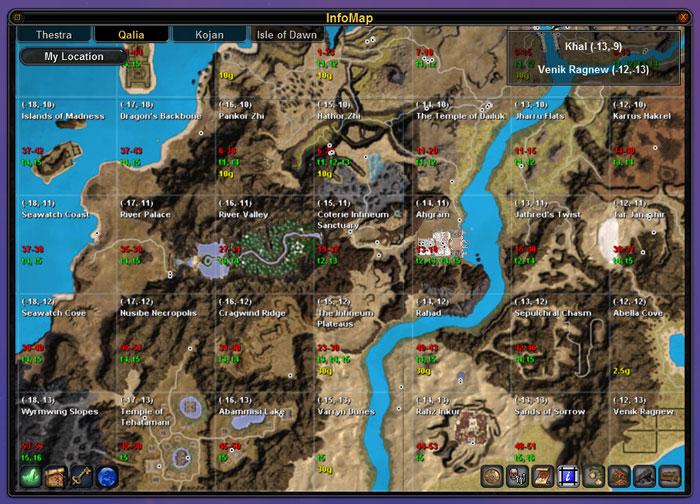
Qalia Map with Zones Data Layer (v2.0)
|
| |
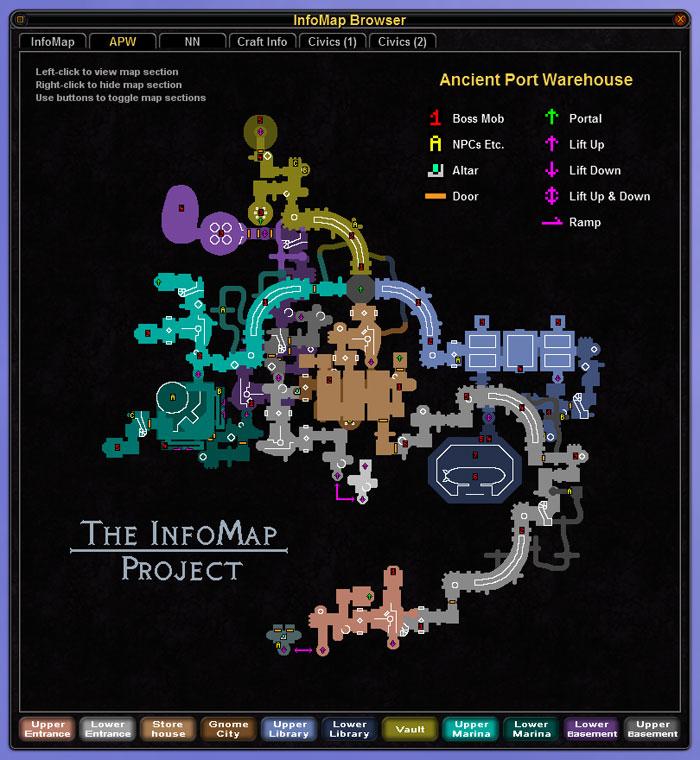
Full Map of Ancient Port Warehouse (v2.0)
|
| |
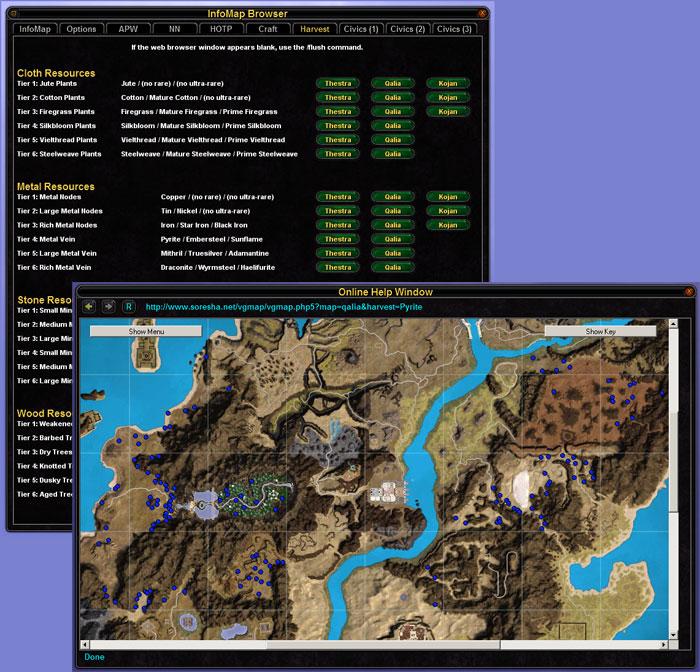
Harvesting Information and Maps (v2.3)
|
| |
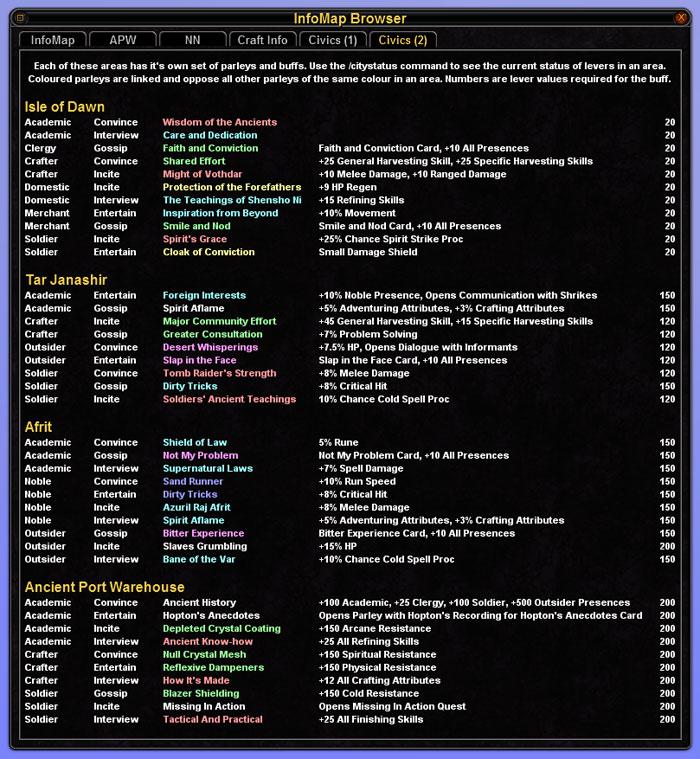
Civic Information (v2.1)
|
| |
InfoMap Advanced v2.8
InfoMap is a Vanguard UI map mod for use ingame. It is a joint project with contributions from Cobal, Drakonar, Malacki, Maraka, Nadger, Sinisna, Soresha, Techywarrior and Xndyr.
The advanced version of the InfoMap mod includes significantly more functionality than the default Vanguard UI. - Enhanced terrain maps showing roads, rivers and major structures.
- Higher resolution maps of the cities.
- Browser window with interactive dungeon maps for Ancient Port Warehouse, Nusibe Necropolis and Halls of the Pantheon. The dungeons are divided into sections which can be controlled by left/right clicking on the map sections.
- Resource data layers with PoIs for metal, stone, wood and cloth. Additional data layers for services and diplomacy PoIs plus unusual resources including Corrupted Steelweave and the spores in the Ruins of Vol Tuniel. All data layers can be toggled on/off. Distinct markers for each of the PoI types, with a key to the markers given in a separate window.
- Labelled PoIs on the diplomacy/miscellaneous data layer for quest mobs and other locations, e.g. Pantheon and Griffon quest targets, prestige title NPCs and psionicist gestalts.
- Zone information layers which can be toggled on/off, showing the name and coordinates for each zone plus the harvesting resource tiers, mob level ranges and plot prices for housing areas.
- Text layers showing names and locations for towns, outposts and dungeons which can be toggled on/off.
- Direct access to the web-based PoI maps on Soresha.net providing a full look-up service for the PoI database, with many different search and display options available.
- Improved riftway window providing quicker access to all riftways in Telon, easily accessible for viewing at any time.
- Resizable mini map, with functionality to zoom in/out by double/right clicking over the map. Optional buttons on the mini map to open the windows for the riftways, browser window, key and web-based PoI maps.
- Three optional hotbars which can be re-positioned in layout mode. Two hotbars have buttons to control the data layers for resources and other information. The third hotbar has buttons to open the riftway, browser, key and web-based PoI map windows.
- Option for initial selection of resource data layers according to character's harvesting skills, triggered by moving the mouse over the mini map after logging in.
- Smaller icons for ingame and CustomPoIName.txt file PoI markers.
- Essential craft information for attuning catalysts, upgrade recipes, spell components and enchantment socketing included as a tab within the browser window.
- Harvesting resource and node information included as a tab within the browser window, with buttons to query each resource and continent in the web-based PoI maps.
- Individual house and guild hall plot locations accessible on the harvesting tab in the browser window, via buttons to query the web-based PoI maps for each continent.
- Details of civic parleys in different regions, the buffs they grant and their threshold lever values included as three tabs within the browser window.
- Optional, free-floating button to open the web browser window at a redirector page, providing easy access to useful community sites or any other web page from within the game
- UI Customizer program to configure InfoMap from outside the game. Allows unwanted components of the mod to be disabled which may improve performance/FPS (results will vary depending on other factors such as PC hardware and graphics settings). Also provides options to set the default data layers displayed when logging in.
The date in the filename indicates when the data was extracted from the PoI database. The PoIs are collected by players using an Automatic Logging System and comparison scripts are used to check new data, so the accuracy of the data is high.
The map mod can be installed on it's own or combined with other map standards compliant UI mods. It can also be used in conjunction with a CustomPoINames.txt file for your other PoIs.
Installation instructions and further details are available on the project web page: http://www.soresha.net/infomap/
Replacement Data Images
Updated data images for InfoMap Advanced are available from the project web page. These updates will be generated as new data becomes available in the PoI database and announced via the website's RSS feed.
InfoMap + MiniCards + GearSwitcher
This is also a version of InfoMap for stand-alone use which includes the MiniCards and GearSwitcher mods integrated within it. This is available here.
|
| Archive List (Old Versions) |
File Name |
Version |
Size |
Author |
Date |
|
v2.7 |
3.97 MB |
Soresha |
01-27-2013 01:42 PM |
|
v2.6 |
3.97 MB |
Soresha |
11-11-2012 10:30 AM |
|
v2.5 |
3.93 MB |
Soresha |
08-19-2012 08:01 AM |
|
v2.4 |
3.88 MB |
Soresha |
07-20-2010 12:32 PM |
|
v2.3 |
3.81 MB |
Soresha |
01-25-2010 02:16 PM |
|
v2.2 |
3.61 MB |
Soresha |
08-02-2009 11:06 AM |
|
v2.1 |
3.60 MB |
Soresha |
03-22-2009 10:20 AM |
|
v2.0 |
3.29 MB |
Soresha |
01-12-2009 01:12 PM |
|
v1.12 |
2.99 MB |
Soresha |
12-04-2008 12:41 PM |
|
v1.11b |
2.99 MB |
Soresha |
10-24-2008 02:25 AM |
|
v1.11 |
2.99 MB |
Soresha |
10-23-2008 12:31 PM |
|
v1.10 |
2.99 MB |
Soresha |
09-10-2008 03:13 PM |
|
v1.9 |
2.72 MB |
Soresha |
08-12-2008 11:53 AM |
|
v1.8 |
2.75 MB |
Soresha |
06-25-2008 01:00 PM |
|
v1.7 |
2.33 MB |
Soresha |
06-11-2008 02:18 PM |
|
v1.6 |
2.27 MB |
Soresha |
05-17-2008 04:39 AM |
|
v1.5 |
2.27 MB |
Soresha |
03-26-2008 02:51 PM |
|
v1.4 |
2.16 MB |
Soresha |
03-11-2008 01:20 PM |
|
v1.3 |
2.58 MB |
Soresha |
01-05-2008 10:13 AM |
|
v1.3 |
2.56 MB |
Soresha |
12-19-2007 01:27 PM |
|
v1.2 |
2.56 MB |
Soresha |
12-16-2007 06:52 AM |
|
v1.1b |
2.74 MB |
Soresha |
12-13-2007 12:19 PM |
|
v1.1 |
2.74 MB |
Soresha |
12-10-2007 02:59 PM |
|
v1.0 |
2.75 MB |
Soresha |
11-18-2007 11:25 AM |
|
v0.2 |
2.74 MB |
Soresha |
09-30-2007 10:30 AM |
| File Statistics |
| User Rating: |
|
| Downloads: |
33723 |
| Views: |
92355 |
| Favorites: |
77 |
| Uploaded By: |
|
| Last Modified: |
N/A |
|
|  |
|
 |
|
 08-19-2012, 08:55 PM
|
|
Junior Member
Forum posts: 3
File comments: 3
Uploads: 0
|
Thanks for the update!
|


|


|
|
08-18-2012, 06:52 PM
|
|
Junior Member
Forum posts: 0
File comments: 1
Uploads: 0
|
I am looking forward to using this as the default map leaves much to be desired; thank you for your hard work in maintaining and updating this map add on.  |
|
|
|
|
08-18-2012, 03:09 AM
|
|
Senior Member
Forum posts: 320
File comments: 21
Uploads: 6
|
Re: Ugly and Unmovable Redirect button temp fix...
http://vginterface.com/forums/sh...&postcount=307
Ugly is subjective but you're entitled to your opinion. 
To explain the history here, the URL pointed to was a web page set up by another UI modder, and his site has since died. That's why unfortunately it only shows random adverts at the moment. I will be replacing this with a page on my own web site. Something close to Techywarrior's original content - links to useful fan sites and a re-direct box to allow entry of any URL you wish to visit.
However the redirector button it is NOT unmovable, you simply need to go into layout mode to move it. There are also legitimate methods provided to remove the button both temporarily or permanently if you wish, they are explained on the options window.
I have also replied to your post on the technical reasons why your "fix" is no fix at all and a very bad suggestion for anyone to follow. Please take the time to learn and understand how Vanguard's UI mods work, before making recommendations that would be detrimental to others should they follow them.
|
|
|
|
|
08-17-2012, 10:24 PM
|
|
Junior Member
Forum posts: 12
File comments: 22
Uploads: 0
|
Ugly and Unmovable Redirect button temp fix...
|
|
|
|
|
08-16-2012, 06:48 AM
|
|
Junior Member
Forum posts: 0
File comments: 1
Uploads: 0
|
Re: Re: Update this thing!
Looking forward to the update. Love this UI
|
|
|
|
|
08-16-2012, 06:02 AM
|
|
Senior Member
Forum posts: 320
File comments: 21
Uploads: 6
|
Re: Update this thing!
Quote:
|
With VG now f2p people are gonna want working maps and there are a few bugs as it stands now, it still works but there is much room for improvement now! better features and whatever. Maybe even add an NPC tracker or sorts.
|
I'm working on updating InfoMap for the recent F2P changes.
As for "much room for improvement" you really don't know what you're talking about. Vanguard has never had (and probably never will have) the capability in the client to do the kind of POI manipulation that is common in other MMOs. InfoMap is a fully packed UI mod, which pushes the limit of what can actually be done for this game.
If as the game evolves there are new NPC types or locations which can be fitted onto the existing data layers - this can be done fairly easily.
However there will likely not be any more major new features at this point. Because:
a) What you might think is missing, is not technically possible within the scope of a UI mod for Vanguard.
b) New features must be balanced against the increase in UI "bloat" which slows down the game. There are good technical reasons for being careful how much you put in.
Do not under-estimate the skill and effort of the many experienced UI modders who over the years have explored different possibilities. Many ideas succeeded, others such as dungeon maps had to be abandoned as unworkable. InfoMap is a very mature UI mod and it's been taken pretty much as far as a map mod for Vanguard can go. |
|
|
|
|
08-15-2012, 06:33 AM
|
|
Junior Member
Forum posts: 12
File comments: 22
Uploads: 0
|
Update this thing!
With VG now f2p people are gonna want working maps and there are a few bugs as it stands now, it still works but there is much room for improvement now! better features and whatever. Maybe even add an NPC tracker or sorts.
|
|
|
|
|
05-25-2009, 07:58 AM
|
|
Senior Member
Forum posts: 320
File comments: 21
Uploads: 6
|
Re: Infomap &
I was snooping around in my System Event Viewer, to check on some things and noticed a whole lot of "Errors". They all seem to be related with Vanguard and the Infomap addon to my UI.
Here is one of the many errors.
Event Type: Error
Event Source: VGClient.log
Event Category: None
Event ID: 1
Date: 5/21/2009
Time: 2:16:22 PM
User: N/A
Computer: -x-x-x-x-x-x-
Description:
The description for Event ID ( 1 ) in Source ( VGClient.log ) cannot be found. The local computer may not have the necessary registry information or message DLL files to display messages from a remote computer. You may be able to use the /AUXSOURCE= flag to retrieve this description; see Help and Support for details. The following information is part of the event:[05/21/09 02:16:22] ERROR: XML Error: ..\VGUIAssets\Shells\InfoMapAdvanced\Map\RiftMaps. xml [780:49] - Attribute 'textColor' is not declared for element 'TextField'
There are a bunch more errors like this one involving Infomap with different elemants involved with the errors
Any fixes for this? I Was thinking that maybe infomap is outdated and needs a patch, or whatever. I'm no programer and was wondering if anyone has a solution to this?
It's not really a big deal. It just means the xml attributes don't strictly meet what's in the schema. It may even mean the schema is out of date, because the game is quite happily using those attributes on those elements.
InfoMap itself is not out of date, there was no need for an immediate update for the latest patch. I am planning a new version though, to add the Pantheon civic buffs and maybe a few other things... honestly I'm a bit too hooked into enjoying the new content atm, but I'll do it at some point.
If you would like to send me the list of things it's complaining about, I can see about changing the attributes in the next version.
|
|
|
|
|
05-21-2009, 03:57 PM
|
|
Junior Member
Forum posts: 0
File comments: 1
Uploads: 0
|
 Infomap & "errors in system event viewer"
I was snooping around in my System Event Viewer, to check on some things and noticed a whole lot of "Errors". They all seem to be related with Vanguard and the Infomap addon to my UI.
Here is one of the many errors.
Event Type: Error
Event Source: VGClient.log
Event Category: None
Event ID: 1
Date: 5/21/2009
Time: 2:16:22 PM
User: N/A
Computer: -x-x-x-x-x-x-
Description:
The description for Event ID ( 1 ) in Source ( VGClient.log ) cannot be found. The local computer may not have the necessary registry information or message DLL files to display messages from a remote computer. You may be able to use the /AUXSOURCE= flag to retrieve this description; see Help and Support for details. The following information is part of the event:[05/21/09 02:16:22] ERROR: XML Error: ..\VGUIAssets\Shells\InfoMapAdvanced\Map\RiftMaps. xml [780:49] - Attribute 'textColor' is not declared for element 'TextField'
There are a bunch more errors like this one involving Infomap with different elemants involved with the errors
Any fixes for this? I Was thinking that maybe infomap is outdated and needs a patch, or whatever. I'm no programer and was wondering if anyone has a solution to this?
|
|
|
|
|
04-10-2009, 12:55 PM
|
|
Junior Member
Forum posts: 0
File comments: 1
Uploads: 0
|
Does this mod play well with Live Gamer?
Hello, first of all, thank you for this mod! I would not be able to play the game at all without it!
I'm beta testing Live Gamer and for some reason the window that's supposed to pop up at the exchange is not. I was just wondering if maybe that had anything to do with this mod.
Are you testing it with Live Gamer?
|
|
|
|
|
12-31-2008, 07:55 PM
|
|
Junior Member
Forum posts: 0
File comments: 1
Uploads: 0
|
I love the Info Map, I'm using it with Darker 2.0 (UI) and it's awesome. I'm just having one problem...I can't seem to get my mini map buttons to work! I select ON from the Info Map options, and nothing happens. Any idea what I can do to rectify this?
Edited to add: It looks like they're there, they just can't be seen. If I click on the area of the minimap where they are (upper left hand corner), I get the actions..but not seeing what I'm clicking on is an issue. :x
Last edited by anillee : 12-31-2008 at 08:02 PM.
|
|
|
|
|
09-25-2008, 04:12 PM
|
|
Senior Member
Forum posts: 320
File comments: 21
Uploads: 6
|
Re: coordinates box in top right corner
I really love your map and have been using it within CoreUI3. I have a question about the map as it displays for me. In the top right corner of my map is a box with the coordinates of the chunk I am in. It is always there covering up the "My Location" button and part of the "Thestra", "Qualia" and "Kojan" buttons. Is there a way I can turn off this coordinate box?
Thanks.
It could cover the buttons on the left if you've made the map window very very narrow I suppose. There isn't currently a way to turn it off, unless you want to edit the xml yourself. I'd just stretch the window out to make it larger if I were you. |
|
|
|
|
09-23-2008, 08:03 AM
|
|
Member
Forum posts: 31
File comments: 8
Uploads: 11
|
coordinates box in top right corner
I really love your map and have been using it within CoreUI3. I have a question about the map as it displays for me. In the top right corner of my map is a box with the coordinates of the chunk I am in. It is always there covering up the "My Location" button and part of the "Thestra", "Qualia" and "Kojan" buttons. Is there a way I can turn off this coordinate box?
Thanks.
|
|
|
|
|
09-22-2008, 12:50 AM
|
|
Junior Member
Forum posts: 21
File comments: 9
Uploads: 0
|
LOL... I am so sorry, ya I was posting here about the moving of the minibar (which you answered and it worked) and I just kind of went off with other questions not even thinking - eeeek lol.
Sorry about that!
(Yup, I am using Core atm, and then will be switching to CustomUI once the core setup is 'solid')
------------------------------------------------------
I keep hitting "-" on a few of my hotbars each time I log in.
I see the external app has settings to set sizes/spacing.
If I understand correctly and this does what I want except permanently... what settings on size/spacing would I use to emulate the effect of clicking your predefined "-" size?
Awesome - thanks.
Are you a CoreUI user by any chance? I think you are confusing CoreUI (a full mod) and InfoMap (which is included in Core). What you are talking about is not part of InfoMap.
|
|
|
|
|
09-20-2008, 07:05 PM
|
|
Senior Member
Forum posts: 320
File comments: 21
Uploads: 6
|
Just noticed that doing what I did has stopped zooming in and out from working. Gonna have to find an alternative solution.
You need to take the windows called "1" and "2" out of the VGMiniMap.xml file. That will remove the entire windows that cause the triggering of the layers.
|
|
|
|
All times are GMT -5. The time now is 11:02 PM.
|
|