|
| Category: Complete SetsmyUI v6.2 (GU6) |
| Interface Information |
|
| Name: |
myUI v6.2 (GU6)  |
| Author: |
|
| Date: |
09-20-2008 12:01 PM |
| Size: |
8.08 MB |
| Version: |
v6.2a (GU6) |
| Rate Addon: |
 |
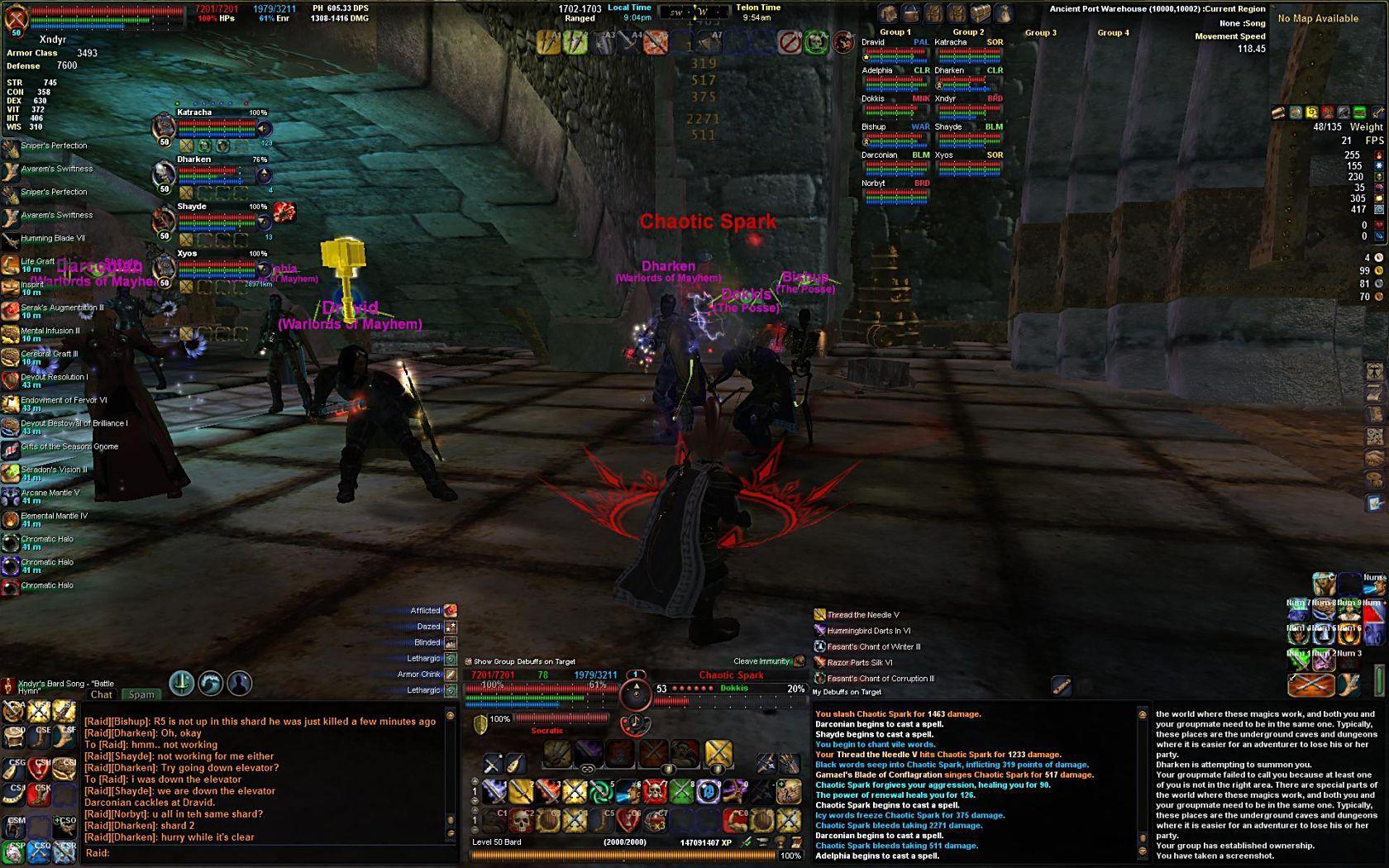
Primary Screenshot - myUI in action
|
| |
myUI Portal
This project has been a work-in-progress for nearly a year and a half, and even before that has evolved through a few other MMOs. Each game (EQ, EQ2 and now VG) has added something different that resulted in what you see now. I hope you enjoy it. Please use the links below (or to the right) to submit feedback or find information about myUI.
Bug Tracker:
CLICK HERE
Feature Request:
CLICK HERE
FAQ:
CLICK HERE
ChangeLog:
CLICK HERE
Don't Forget that there are numerous myUI Color Packs!
Amethyst, Emerald, Ruby, Onyx, Silver, & Gold
you can find all of them here:
http://vginterface.com/downloads/cat7.html
Update Notes v6.2 (19 Sept 08):
This is a small but worthwhile update. All of the existing problems with the scrolling beneficial bufflist have been fixed, and so I wanted to release this as soon as possible. A few other little things are included as well. v6.2a fixed a problem with a couple of missing files. Make sure you have v6.2a (v6.2 will cause a CTD).
New Features: - The previous Scrolling Beneficial Buff window was riddled with problems (double-listed buffs, countdown timers that didn't update, new problems introduced with GU6 like the window reseting, etc) and I have rewritten the whole code and found a much improved approach to the design of the window. ALL the problems have been fixed. *dances a jig*
- The window is Resizable, so don't forget to set it to the size you like

- The bufflist only scrolls when you have more buffs on your character than the size of the window can display at once. After that it will scroll when ever you move your mouse inside of the window and roll your mousewheel up and down.
- I deleted the two folders that contained the two different versions of the bufflist xml. I don't see any need to provide both any longer. If you don't want the window to scroll, just size it as large as you want, and you can even use the ui-scale commands (but that has to be done every session--SOE problem), and as mentioned above, the window only scrolls once you have too many buffs for the size of the window.
Bug Fixes and Updates: - Fixed a few graphical problems with some of the textures.
- Updated a few of the windows for ease of moving them around in layoutmode.
- Updated 3 of the preset window layouts, and included them in the "bin" folder inside of the zip file. Remember that those files don't go in to the vgassets folder, but inside of the bin folder within your vanguard installation folder.
- Fixed a couple minor xml files for problems introduced with GU6 and how the game client interprets certain properties. (hopefully SOE fixes the problem.. I see it as a bug. why should we lose the ability to resize a window only in layoutmode? -- the change made it so that you cannot resize a window and SAVE those settings unless the "movable" property exists in the window settings; which means that you can't restrict the resizing function to layoutmode only. I would much prefer to be able to only resize a window when i enter layoutmode, so that i don't inadvertantly move a window that I don't want moved).
Update Notes v6.0 & 6.1 (17 Sept 08):
this update will adds in the new functionality that was added with the last GU6 update.
New Features: - Added in a new Small Riftway map that displays all rifts on a single map with all 3 continents
Bug Fixes and Updates: - Fixed an issue with the Quest Journal so that the Rewards section will properly display the Item rewards when more than 5 are possible (the default quest window will wrap the quest rewards and I fixed the Book quest journal to follow the same pattern)
- Added in the latest InfoMap distribution
- Added in all new UI features that were introduced with GU6
- Fixed a few problems that were introduced as a result of client changes in GU6 (the client doesn't interpret the xml the same so some windows weren't saving settings or could not be resized--hopefully that is fixed).
- Reverted back to using a non-scrolilng Beneficial bufflist window--there are just too many problems when the window is used as a scrolilng window, but I am still trying to solve the problem and come up with a better implementation). the scrolling window is still available in the zip file in a separate folder that can be copied in to the /windows folder.
- Fixed a problem with the pet Grafts button not opening up the Grafts bag.
Notes v5.0 (16 June 08):
this update will adds in the new functionality that was added with the last GU5 update. Calling this update v5.0 to keep it in line with changes that were added in Game Update 5.
New Features: - Added in the new Quest Journal enhancements
- Updated the Journal "Book" to add in the 3 new tabs that allow a player to view Adventuring Quests, Crafting Quests and Diplomacy Quests in their own window.
- Updated the Book to add the new tabs, and to add the new Sorting features, as well as the Quest Details features.
- Updated some of the functionality of the Journal so that the page (tab) you're currently looking at is visible (it used to disappear) and highlighted.
Bug Fixes and Updates: - Added a few folders to the zip file that allow a player to choose between a few UI options, such as:
- HUD options: to have the windows Linked/(hooked) or Unlinked
- SpellEffect options: to use a scrolling window or a non-scrolling windon
- Skin Texture options: to use the default UI textures or to use the myUI color packs (which should be done and ready for upload by the end of the week).
- No major bug fixes in this update. A few things on my to-do list, but life has kept me very busy so I haven't had time to address some of the thing I'd like to fix (cosmetic mostly).
Update Notes v3.1 (26 mar 08):
this update will fixes a few problems introduced with the last GU4 update as well as adding features for today's patch.
New Features: - Added the new Riftway in Tanvu and updated the map files to include the new functionality
- New Scrollable Self Buffs window
- Adjusted the size of the icons so more will fit on the screen before needing to scroll through the list
- Moved the timer text to the left of the Icon (this keeps the height of each buff smaller so that they don't space too far apart)
- Buff window is resizable, from layout mode, so you can stretch the window taller to see more buffs, or narrower if you want to hide the text description
- When too many buffs are in the Buff window, you can now Mouseover inside the window and use your mousewheel to scroll the window up and down to see all buffs (very useful in raids
 ) )
Bug Fixes and Updates: - Removed the Fade effect from the hotkey banks (this wasn't a very popular feature--I didn't like it either, was just playing around to see what was possible).
- Added a new folder in the installation file that allows a player to pick the style of the UI HUD. The default HUD has many secondary windows linked to the offensive target. The readme.txt file has instructions on how to copy the new file if a player wants to move those windows independanty of each other (as well as instructions on how to pick and choose which windows are linked).
- Fixed the problem with many of the hotkey banks reseting their position to "snap" back inside the viewable window borders. They should stay where you put them now.
- Begun work on the color pack textures and reworking some of the basic XML to allow for support of the color packs again.
- This resulted in a smaller download file and smaller installation for now, but reverted back to using the default vgparts texture files (four of them) for now.
- Once the color pack textures are ready to go again, the new textures will reduce memory usage by probably 75%. They will be available as add-on optional downloads.
- Colors that will be available will be: Onyx, Amethyst, Ruby, Emerald, Silver, Gold and Platinum. (or if you prefer, black, purple, red, green, light grey, yellow and white hehe)
- And a few other misc bug fixes that I can't remember right now as I write this read the official myUI thread for things that I have probably fixed from feedback from users there
Update Notes v3.0 (10 mar 08):
this update will bring myUI in to compatibility with Game Update #4, along with many other feature enhancements and updates.
New Features: - Added the Raid interface windows, And:
- skinned the Raid Group windows
- added functionality to move groupmembers around from the 4 group windows, instead of having to open the Social window
- Added the new Rift Windows that were added as part of GU4
- Updated the Quest Log window to display more info about each quest -- icons for the type of quest (small group, raid, diplomacy, etc), color coded level of each quest, and other misc enhancements
- Added the most recent InfoMap Advanced Mod
- Added a new Healer/Buffer hotbar to the group window
- Added the New Buff windows, to split out the Self Debuffs and All Debuffs windows as well as the new Target Buff window.
- Added additional Hotkey banks, specifically two new resizable 12x10 hotkey banks
- Redesigned the basic Encounter HUD and streamlined the use of may graphic textures.
- Fixed the Diplomacy XP bar
- Fixed the 10,000 HP/Energy limit -- if you had more than 10,000 in either stat the window woudn't display properly because the container was too small
Update Notes v2.0 (18 Aug 07):
this update is mostly to bring myUI in to compatibility with Game Update #2.
New Features:
This is mostly a bug fix update, to correct some problems with the release of the color packs and missing/buggy texture references for the maps and background. A few requested features have been added however.
New Features: - Added the Rest XP info to the Experience Bar
- Added the new Quest tracking features to the Quest Log
- Added the BETA InfoMap mod
- Added the Raid management window
- Added the LFG tool to the Group Window
- Added a new Color Pack and updated xml files to reflect new graphic images found on the default textures
- ---I know that there may still be a few remaining new features that I need to add, and that there may be a bug or two in my update, but I wanted to push this out sooner rather than later since I need to travel for work for the next week.
Coming Soon: (in no order, or ETA)
*Adding a more caster friendly info panel to substitute for the melee DPS panel (and an option to pick and choose ie: hide/unhide)
*redoing the Bard composition window to shrink it up a bit (too much wasted space imo) -- still in progress
*adding a little more *flare* to the minimap border -- no ETA
Feature List:- All new gauges, reminicent of the original Sars look from EQ1, but updated and enchanced for a cleaner and more colorful look.
- Player window
- Target window
- Additional Targets list
- Pet window
- Defensive Target window
- Group window (both horizontal and vertical windows available)
- Info windows along the top border of the screen that will show various player stats, such as Ability stats, melee DPS stats, resists, current chunk, weight, local time, and many more
- a transparent border along the top of the screen that provides contrst to the info windows
- Included 2 hotkey bars developed by Drox for the Logitech G15 keyboard and the number keypad. Modified slightly by me to retain my desired appearance for myUI
- Included the quest journal/ability book released by Drox (with input and assistance from a few other authors--which I'll add as soon as I can find the list again )
- Included High-res maps released by Cobal -- because they look SOOO much better than the default maps.
- a Settings control panel so you can turn on/off select windows and choose which options to display
- a Layout tab that allows you to use one of my five preconfigured layouts for the 5 most common screen resolutions, as well as four slots to save and load your own layouts
|
| Archive List (Old Versions) |
File Name |
Version |
Size |
Author |
Date |
|
v6.2 (GU6) |
8.08 MB |
Xndyr |
09-20-2008 01:45 AM |
|
v6.1a |
8.09 MB |
Xndyr |
09-18-2008 01:13 AM |
|
v6.1 |
8.09 MB |
Xndyr |
09-18-2008 12:45 AM |
|
v6.0 |
10.48 MB |
Xndyr |
09-10-2008 02:02 PM |
|
v6.0 |
4.56 MB |
Xndyr |
06-16-2008 02:37 AM |
|
v3.1 |
4.51 MB |
Xndyr |
03-26-2008 11:04 PM |
|
v3.0 |
10.13 MB |
Xndyr |
03-11-2008 02:32 AM |
|
v2.0 |
4.43 MB |
Xndyr |
08-18-2007 12:46 PM |
|
v1.2 |
4.36 MB |
Xndyr |
07-09-2007 02:43 AM |
|
v1.1 |
4.36 MB |
Xndyr |
06-19-2007 11:56 PM |
|
v1.0 |
9.94 MB |
Xndyr |
06-11-2007 03:06 AM |
|
v0.96 |
3.76 MB |
Xndyr |
06-08-2007 02:33 AM |
|
v0.95 |
3.77 MB |
Xndyr |
05-29-2007 05:11 PM |
| File Statistics |
| User Rating: |
|
| Downloads: |
18095 |
| Views: |
38101 |
| Favorites: |
33 |
| Uploaded By: |
|
| Last Modified: |
09-21-2008 01:21 PM by Xndyr |
|
|  |
|
 |
|
 10-09-2008, 10:49 AM
|
|
Junior Member
Forum posts: 0
File comments: 1
Uploads: 0
|
erroron start up
hi , i followed the read me to the T but am getting an error when i launch game. the error has no description. any ideas? thanks
|


|


|
|
10-04-2008, 05:25 PM
|
|
Junior Member
Forum posts: 0
File comments: 1
Uploads: 0
|
Maddy Craft
I love this UI, But I can't play without Maddy Craft.. I've tried to put it in myself with no luck.
Do you think you could add maddy craft to you ui?
and if not can you think of any reason why it might not work.
Thanks
|
|
|
|
|
09-24-2008, 11:39 PM
|
|
Fabled DM Author
Forum posts: 26
File comments: 23
Uploads: 2
|
Great work man, now go get some sleep :P
|
|
|
|
|
09-20-2008, 03:05 AM
|
|
Senior Member
Forum posts: 148
File comments: 45
Uploads: 7
|
Quote:
Why (specifically) was the scrolling buff bar removed? I thought this to be one of the best aspects of this UI 
|
I think you'll find the answer to you question above, now, in the release notes for v6.2... but to provide a bit more insight, here ya go:
There were known bugs with the scrolling bufflist (that affected different players differently, depending on how often they might cast a spell or how many Guildhall buffs they might have). GU6 also introduced other problems that has been frustrating to many players and modders, as a lot of game windows suddenly reset everytime you relog. (this affected a lot of mods with resizable hotkey banks and affected my scrolling bufflist, as just two examples).
I decided to remove it until I could figure out what the hell they changed in the client and determine if that new problem could be fixed. And, while I was doing that, I decided to take a deeper look in to the code for that window again and was more persistent this time in finding a solution to the other problems.
At the end of a good night or two of experimenting I found a solution to all of the problems and so v6.2 now includes the best damn scrolling bufflist around (*cough* If I do say so myself *cough*) heheheh It was never my intention to remove it permanently and it was still included in the zip file in one of the optional folders, i just decided that it was causing too much grief until the problems could be fixed. And now they have
I hope you enjoy it.
Last edited by Xndyr : 09-20-2008 at 03:08 AM.
|
|
|
|
|
09-18-2008, 11:42 PM
|
|
Fabled DM Author
Forum posts: 26
File comments: 23
Uploads: 2
|
Why (specifically) was the scrolling buff bar removed? I thought this to be one of the best aspects of this UI |
|
|
|
|
09-11-2008, 11:16 AM
|
|
Junior Member
Forum posts: 0
File comments: 2
Uploads: 0
|
The Version 6 zip is missing the Bin and G15 folders and one of the needed XML files (myUI_EncounterDisplayParts). I grabbed the ones from the June release.
Otherwise looking good so far.
|
|
|
|
|
09-10-2008, 02:11 PM
|
|
Senior Member
Forum posts: 148
File comments: 45
Uploads: 7
|
Version 6 just released! -- compliant with GU6.
A few fixes and additions, but I'll write more about that when I get back from the little business trip I'm currently on  |
|
|
|
|
08-21-2008, 02:34 AM
|
|
Senior Member
Forum posts: 148
File comments: 45
Uploads: 7
|
Just an update.
COLOR PACKS are once again available!!!
look at all the options you can pick from on my Portal page.
They are compatible with myUI v5.0 and newer (will be compatible w/ GU6).
|
|
|
|
|
08-07-2008, 10:21 PM
|
|
Junior Member
Forum posts: 0
File comments: 1
Uploads: 0
|
My friend and I just came back to VG and we have both been using this UI for a couple weeks now. I tried all of the popular ones and this one is by far the best. Excellent work!
My mini map did not work either so i used the infomap and added it in to this UI.
|
|
|
|
|
08-03-2008, 11:00 PM
|
|
Junior Member
Forum posts: 0
File comments: 1
Uploads: 0
|
I installed the ui everthing setup great.Only issue is i have no mini map.
The box is there but nothing else and my main map is stuck in one place.
|
|
|
|
|
07-26-2008, 02:20 PM
|
|
Premium Member
Forum posts: 3
File comments: 2
Uploads: 0
|
Great UI Xndyr! Did you have an update on the color packs yet?
|
|
|
|
|
06-26-2008, 10:48 PM
|
|
Junior Member
Forum posts: 0
File comments: 1
Uploads: 0
|
buffs wont show the remain time properly since 26th June patch
could you fix it? thx for your hard working!!!
|
|
|
|
|
06-19-2008, 01:08 PM
|
|
Member
Forum posts: 33
File comments: 11
Uploads: 0
|
Thanks for the update. Loaded and all working well for me.
|
|
|
|
|
06-16-2008, 02:40 AM
|
|
Senior Member
Forum posts: 148
File comments: 45
Uploads: 7
|
Version 5.0 was just uploaded. Mostly just adding the Quest journal functionality (and incorporating those changes in to the Book style quest window) and the Raid Management functionality.
I have a few other things that I still plan to update or add to the UI, but life's kept me very busy the last month (9-month pregnant wife, travel for work and a promotion, in-laws, .. etc etc). so hopefully I'll get a change to add those things over the next week or two.
Enjoy
|
|
|
|
|
06-09-2008, 12:00 PM
|
|
Junior Member
Forum posts: 0
File comments: 3
Uploads: 0
|
Thx for the update !!
|
|
|
|
All times are GMT -5. The time now is 12:19 AM.
|
|