|
| Category: Complete SetsManicUI |
| Interface Information |
|
| Name: |
ManicUI  |
| Author: |
|
| Date: |
10-23-2008 02:33 PM |
| Size: |
4.33 MB |
| Version: |
3.4.3 |
| Rate Addon: |
 |
| Patch & Add-on List |
File Name |
Version |
Size |
Author |
Date |
Type |
|
1.0 |
1.90 Kb |
|
08-05-2009 03:13 PM |
Patch |
|
1.0 |
1.38 Kb |
|
07-14-2009 12:36 PM |
Patch |
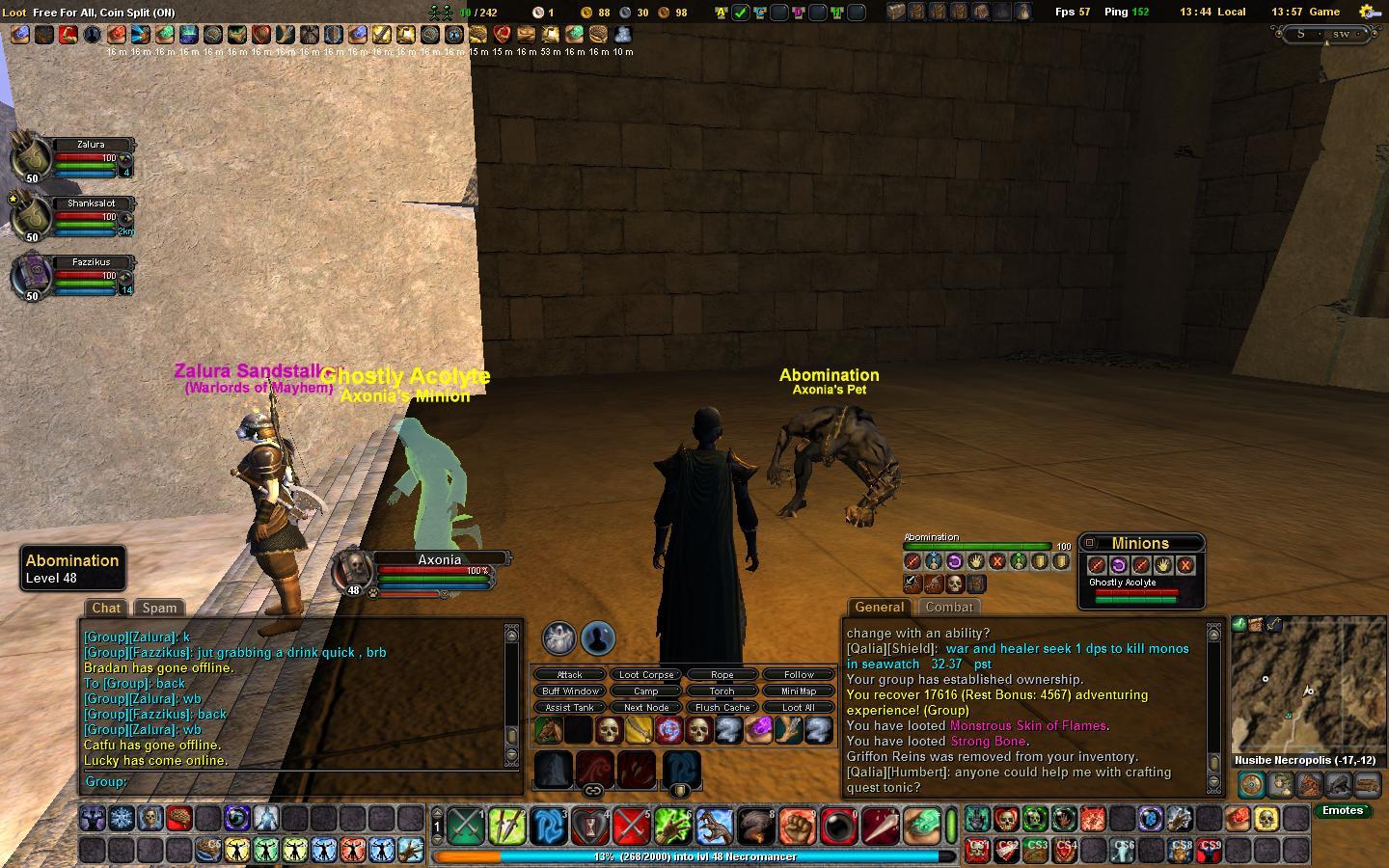
Necro Pet and minion windows
|
| |
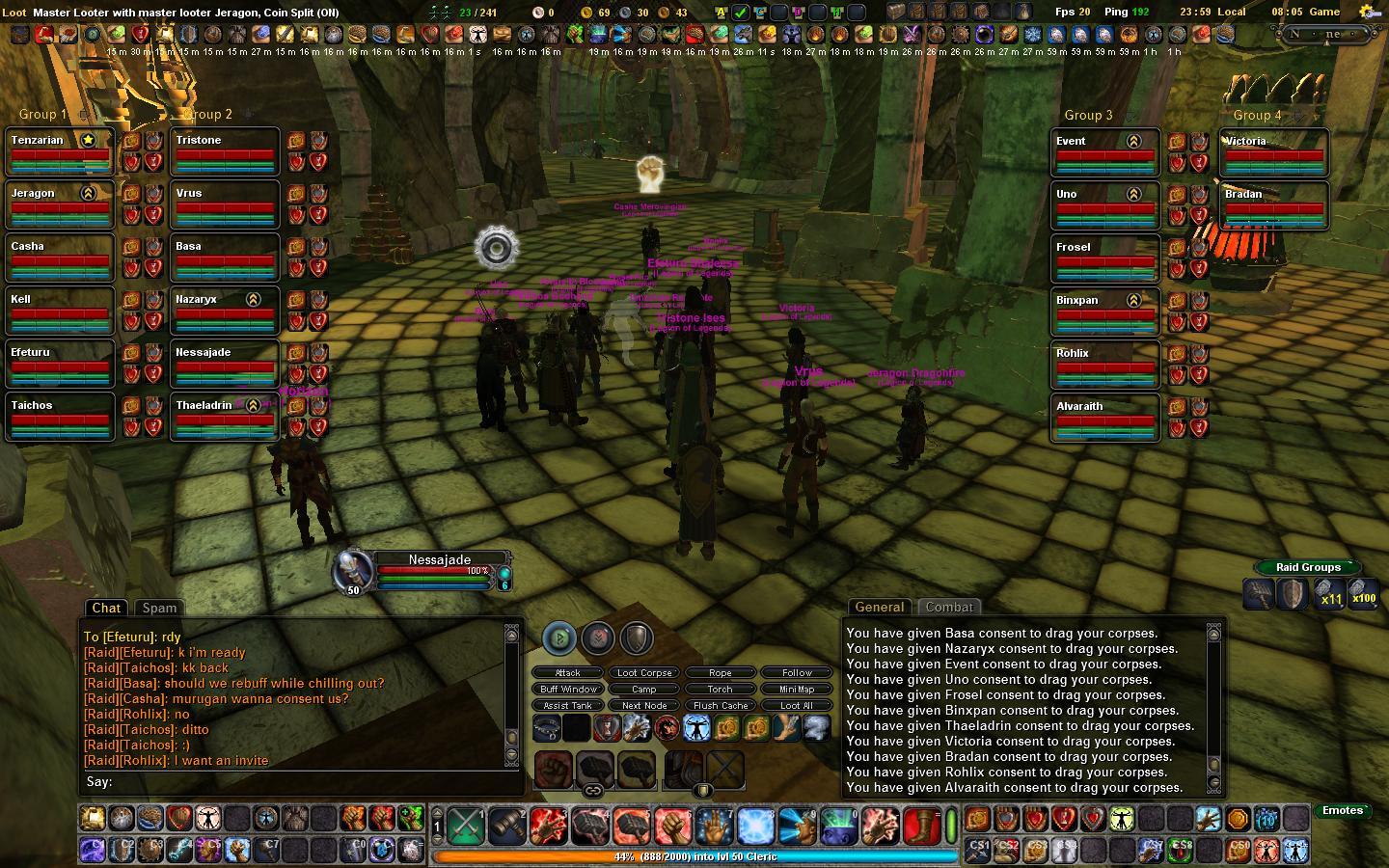
Raid hotkey layout
|
| |
|
|
| |
Version 3.4.3
1. Updated to the latest infomap to support the rift map changes.
Version 3.4.2
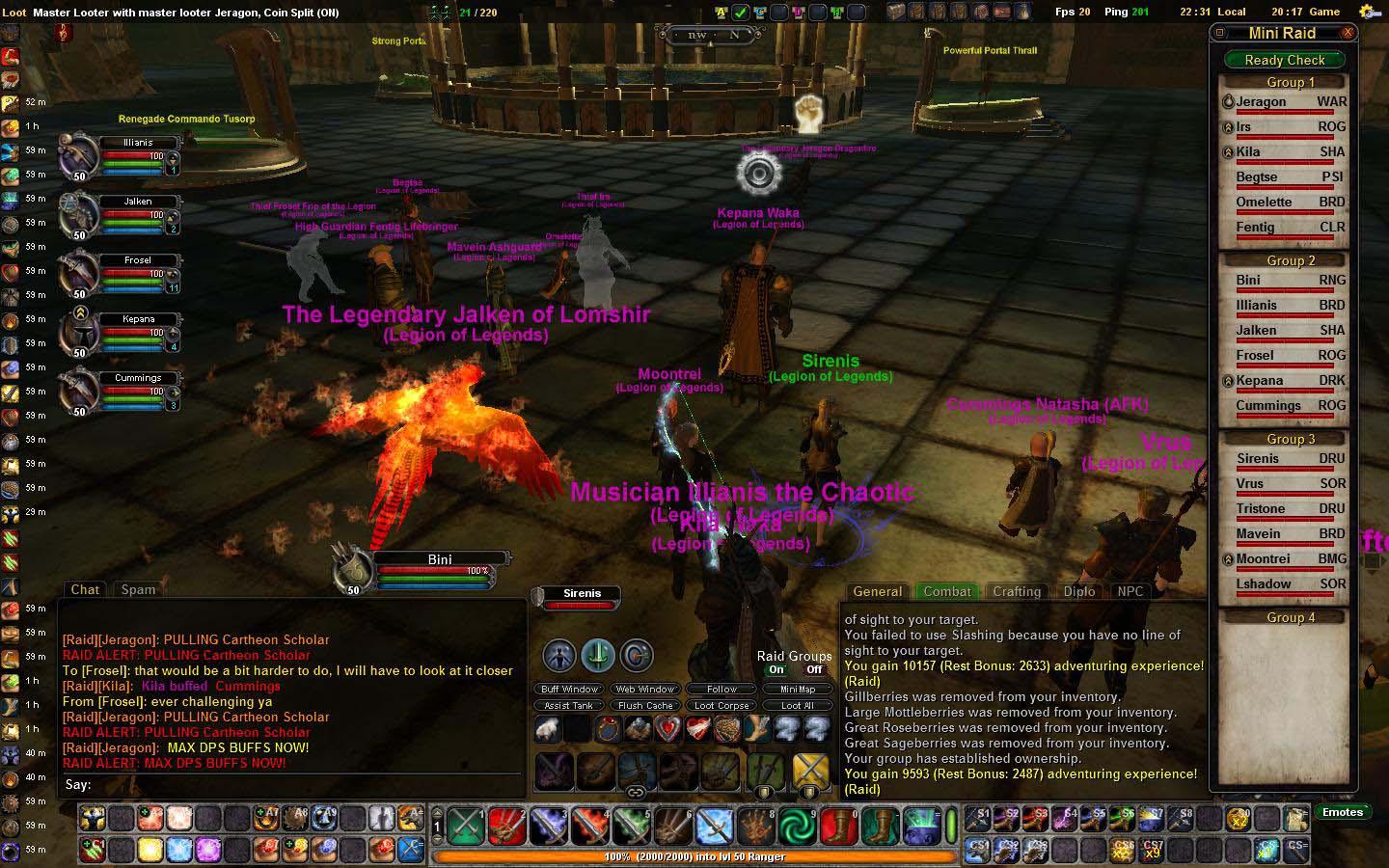
1. Updated the Mini Raid Window to include health bars for each raid member. The Mini Raid Window can now be used for full raid control and monitoring by any raid member. There is not longer any need for hte larger raid windows unless you need to see the energy and endurance bars.
2. Added an option so that the backgrounds can be turned off for all secondard hotbars (popup bars, n52, g15, numberpad)
3. Corrected a numbering issue in the default.ini (user.ini).
4. Updated the default.ini (user.ini) so that the names displayed in game are clear as to the button being mapped.
5. Corrected other minor issues that I cannot remember
Version 3.4.1
1. Added the scrolling buff window created by Xndyr
2. Added backgrounds to the varous button bars so they are easier to see
3. Most button bars now have 10 available banks you can cycle through
4. Updated the key maps to allow for the cycling through the button bar banks (due to limitations on the number of key maps, only the cycle up can be mapped)
The scrolling buff bar is sizable in layout mode. you will need to manually resize and move the benificial buff bar and the harmfull effects buff bar after upgrading.
If you want to use the legacy Buff window, it can be found in the folder "OrginalBuffWindow". Jut copy the file into the "ManicUI\Windows" folder and enjoy.
Version 3.4.0
1. Added class names to the raid windows (by request)
2. Add a fully functional mini raid control window for all you raid leaders
3. You can now select a raid member by clicking their name in the mini control window
4. Removed all usage of /showwindow, /hidewindow and /togglewindow to comply with changes currently on test.
5. Synced with other change to the default UI for GU6 compatibility
6. Re-aranged the shortcut window and added the web window so that it can be open easily.
7. Added InfoMap 1.10
Version 3.3.7
1. Version 1.6 of InfoMap (Again thank you Soresha)
2. Any required xml updates to be compitible wit hthe latest patch
Version 3.3.6
1. New version of InfoMap included (thank you Soresha)
Version 3.3.5
1. Added a window for other web sites (type "/togglewindow Manic Web Window" to activate if you do not use bindings)
2. Added a binding in the default.ini for the web window (CTLR-W). To install follow the directions in the installnotes.txt.
3. Made the web browser window minimizable by double clicking on the window title.
4. Minimized the font in the quest window
5. made the quest tracker only movable in Layout mode
6. Latest version of InfoMap (Added laster release but forgot to mention it
Version 3.3.0.1
1. Added the correct index.xml (had the wrong one)
Version 3.3.0
1. Added usable hotkeys to the raid windows. the bars are hotspot controled (thank you Nadger) so that they are seperate from the raid window and can be used as seen fit.
2. Removed all old references ro CoreUI from the xml code. I did this to enhance compatibility with the current Core versions.
3. Updated UI for GU 5 additions.
4. Added two 2X10 hotkey windows on each side of the screen. These are hot spot enabled and can be turned on and off in the options panel.
Note: Due to the removal of the Core refference. You will need to correct the UI layout and do a /uisave after it is set. you can also use the manic.xml for the default config and go from there.
Credits go to the following individuals for their work which I have included and want to take nothing away from them and hte good work they have done.
Nadger - For CoreUI2 on which this UI is based and the emotes button
AssimX - For the Pet/Minion UI Mod
Darkspells - For the Small bags mod
Fozzik (updated by Nitefang) - For the TinyStrat Mod
Soresha, Cobal, Nadger and Xndyr - For the InfoMap Advanced map mod
Mother - For the Mothers Crafting Window mod
Cristo - For the Stand Alone Dialog mod
Tarod - For the orginal Shortcut window mod
Ryuno - For the Info Panel mod orginaly included in Nadger's Coreui2
Drox - For the orginal healer window, the number pad support and support for the G15 and N52 key sets as well as the Ranged and Melee weapon bars.
Sunicro - For updates to the InfoPanel mod. The items added were the Taiisien options
Xndyr - For the scrolling buff bar
If I have forgotten anybody please let me know and I will give the credit where it is due.
|
| Archive List (Old Versions) |
File Name |
Version |
Size |
Author |
Date |
|
3.4.2 |
4.33 MB |
ManicMat |
10-05-2008 04:31 PM |
| File Statistics |
| User Rating: |
|
| Downloads: |
6872 |
| Views: |
40883 |
| Favorites: |
8 |
| Uploaded By: |
|
| Last Modified: |
N/A |
|
|  |
|
 |
|
 11-02-2009, 01:50 PM
|
|
Junior Member
Forum posts: 28
File comments: 8
Uploads: 1
|
thank you dravid
thank you dravid!!!
|


|


|
|
07-14-2009, 08:02 PM
|
|
Junior Member
Forum posts: 5
File comments: 2
Uploads: 0
|
Update to the 50 slot inventory size
|
|
|
|
|
03-24-2009, 09:08 PM
|
|
Junior Member
Forum posts: 7
File comments: 2
Uploads: 0
|
I really love your UI. It's absolutely terrific (I like the somewhat minimalistic-nature of it). However, I'm having some issues with the crafting. Mothers Crafting UI just doesn't seem to be functioning properly with this UI. I've even tried removing it, but my knowledge of XML is very small, and I wound up losing the entire crafting interface.
I hope you're still updating this  ... |
|
|
|
|
02-19-2009, 08:25 AM
|
|
Junior Member
Forum posts: 2
File comments: 2
Uploads: 0
|
Re: Updates
Realy nice. it works fine... thanks a lot :-)
fabiari
|
|
|
|
|
02-08-2009, 01:29 PM
|
|
Junior Member
Forum posts: 5
File comments: 2
Uploads: 0
|
Updates
I have made the fishing updates to the current version of ManicUI at http://vginterface.com/forums/sh...6&postcount=14
Do this update first.
Also added support for apperance slots at http://vginterface.com/forums/sh...9&postcount=16
Do this update after the fishing one since they have overlapping files.
I can't seem to attach files to posts here. Otherwise would have posted them directly here.
Also heard that new windows available for using Enchantments and it had something to do with the UI. Can someone give me screenshots and pointers to these enchantment windows and thank you.
Unfortunately still can't commit the time to keep this going on. But atleast I will try to keep these XML files coming in whenever I can.
Last edited by Dravid : 02-08-2009 at 02:17 PM.
|
|
|
|
|
02-04-2009, 11:55 AM
|
|
Junior Member
Forum posts: 7
File comments: 5
Uploads: 0
|
Is there anyone out there that uses this ui with a knowledge of xml that is planning on updateing it for the new patch?
|
|
|
|
|
01-07-2009, 08:56 PM
|
|
Junior Member
Forum posts: 7
File comments: 5
Uploads: 0
|
I am wondering if anyone is going to take over updating this excellent ui?
|
|
|
|
|
01-05-2009, 08:52 AM
|
|
Member
Forum posts: 96
File comments: 17
Uploads: 1
|
I am sorry to notify you but I have stopped updating ManicUI. I am no longer playing Vangaurd and at this time do not have any plans of starting up again.
I posted at the end of October that ManicUI was retired.
http://vginterface.com/forums/showthread.html?t=2233
Last edited by ManicMat : 01-05-2009 at 08:56 AM.
|
|
|
|
|
12-27-2008, 04:24 PM
|
|
Junior Member
Forum posts: 7
File comments: 5
Uploads: 0
|
1 other thing i ran across today is no atachments window will pop up when i hit the new atachments button
|
|
|
|
|
12-22-2008, 07:44 AM
|
|
Junior Member
Forum posts: 0
File comments: 1
Uploads: 0
|
I was wondering about the same thing since my tackle box doesn't show up either. I also heard that there is an extra tab to the quest log that keeps track of your fishing success, combos, etc. Would really love to have that included in your UI |
|
|
|
|
12-18-2008, 09:01 AM
|
|
Junior Member
Forum posts: 7
File comments: 5
Uploads: 0
|
hey i was wondering if you were planning an update to allow for fishing being introduced. specifically on the harvesting tab of the character window not sure but im haveing issues with my tackle box not being displayed.
Last edited by winawum : 12-18-2008 at 09:05 AM.
|
|
|
|
|
12-10-2008, 05:01 PM
|
|
Junior Member
Forum posts: 14
File comments: 3
Uploads: 0
|
Health/Mana/End Bar Issue
I've tried using ManicUI in conjunction with CustomUI and on it's own but for some reason the color bars in the group and healer windows don't seem to work.
Anyone else having this issue?
|
|
|
|
|
09-16-2008, 10:28 PM
|
|
Member
Forum posts: 96
File comments: 17
Uploads: 1
|
Unfortunaly the buttons do not auto target the raid member. The game client does not support that yet. It takes some getting used too, but many use the buttons as they are since they do simplify things a bit.
As soon as the support is added, I will be updating the buttons to auto target.
|
|
|
|
|
09-15-2008, 10:34 PM
|
|
Member
Forum posts: 72
File comments: 5
Uploads: 1
|
I want to add your raid groups windows to my CoreUI setup. Any ideas what I need to do to accomplish that? I substituted your ManicUI-RaidManagement.xml for the one it has, but I dont get the group windows when people are added to raid groups.
Update: Ok I figured that part out. Had to add your social window as well. But the buttons on the raid windows dont switch to the target that they are next to. Are they supposed to? That's what I was hoping they would do.
Last edited by Starcrusher : 09-15-2008 at 11:42 PM.
|
|
|
|
|
08-16-2008, 05:46 PM
|
|
Junior Member
Forum posts: 13
File comments: 1
Uploads: 0
|
drox quest journal
Is there any way to get the quest book from drox ui put into this mod? I love the look of that quest book.
|
|
|
|
All times are GMT -5. The time now is 08:13 PM.
|
|